What offline sync means in Loopin
You can add a new entry at any time, and it stays safe in local storage. When the app detects a working connection, it sends your entries to Google Drive in the background. This way, you never lose a write, even on a slow or broken network. For example, if you mark a habit done on a train with no signal, that check is saved locally and synced later. The app treats your local data as truth, not the cloud. So your actions always count, no matter the connection.
What offline-first really means
Why regular cloud apps fail when offline
If a regular cloud app loses internet, it stops working or loses new data. Most of these apps rely on constant internet to save and sync. They may store some data locally for short outages, but only briefly. Any change made offline is not saved properly and can be lost.
Offline-first apps like Loopin are different. They treat the local device as the source of truth. You keep writing data even with no network. Sync happens later, safely. This means no record is dropped just because the connection failed. The app works first, syncs when it can.
Regular apps assume the server is always reachable. Offline-first apps assume the network will fail, and plan for it.
How Loopin makes sure no write is lost
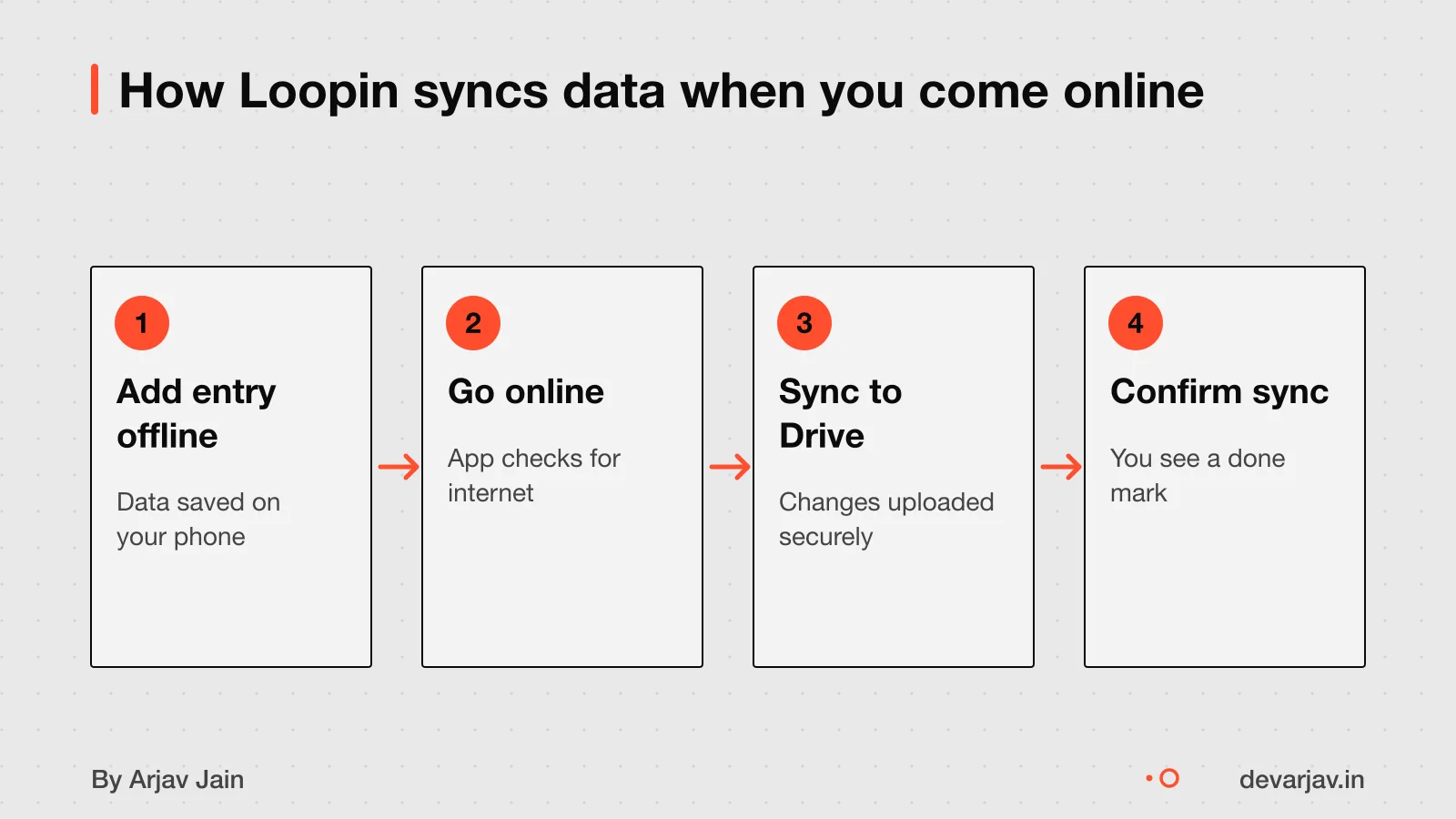
Loopin stores your entries in the phone’s local database as soon as you save them, even with no internet. This means every write is safe the moment you make it. The app treats the local data as the true version until sync completes.
When you are offline, new entries wait in a queue on your device. They do not vanish or get replaced. As soon as your phone reconnects to the internet, Loopin starts sending these queued changes to Google Drive.
Once online, the app syncs local changes to the Cloud Firestore backend. You do not need to open the app or tap a button. This ensures no habit log, note or change is ever lost, even on slow or unstable networks.
For example, if you log five workouts during a train ride with no signal, all five will upload once you reach a station with data. The app does not skip or merge them. Each entry is preserved exactly as you wrote it.
How Google Drive sync works in Loopin
Loopin uses the Google Drive REST API to create and update data.
When you log a habit, Loopin writes the entry locally first, then sends it as a new file to your Drive folder using the API. Each file is named with a timestamp and ID to avoid clashes. If the network fails, the write stays in the queue and retries later.
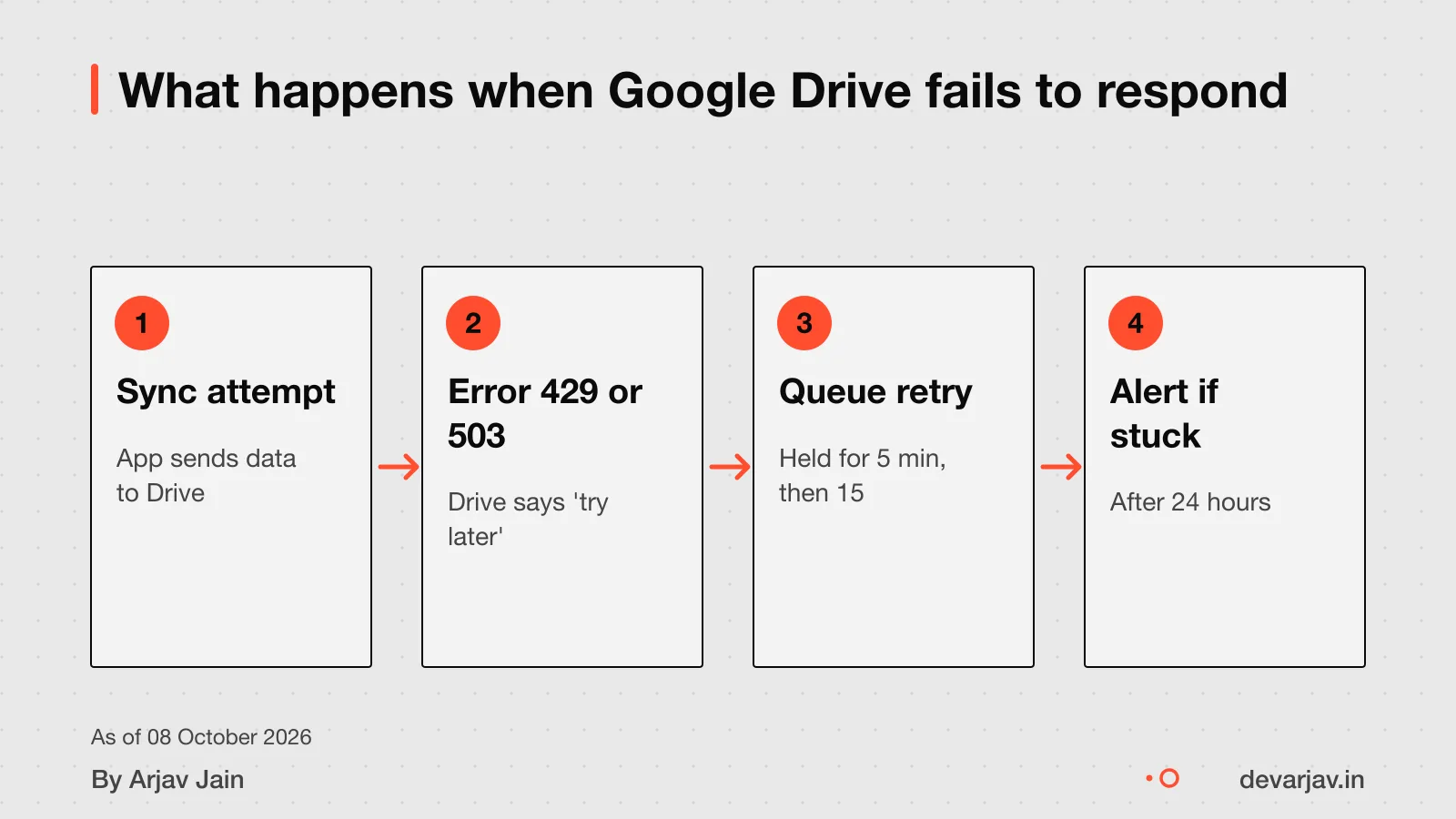
Google Drive apps should catch and handle all errors. For example, if Drive returns a 429 (Too Many Requests), the app waits and resends. It also checks the 500,000 item limit for folders, files, and shortcuts directly in a folder. This keeps sync safe and silent.
Using the API gives fine control. Loopin can check if a file exists, read its revision, and decide whether to update or skip.
How to integrate Google Drive in your app
How data conflicts are resolved
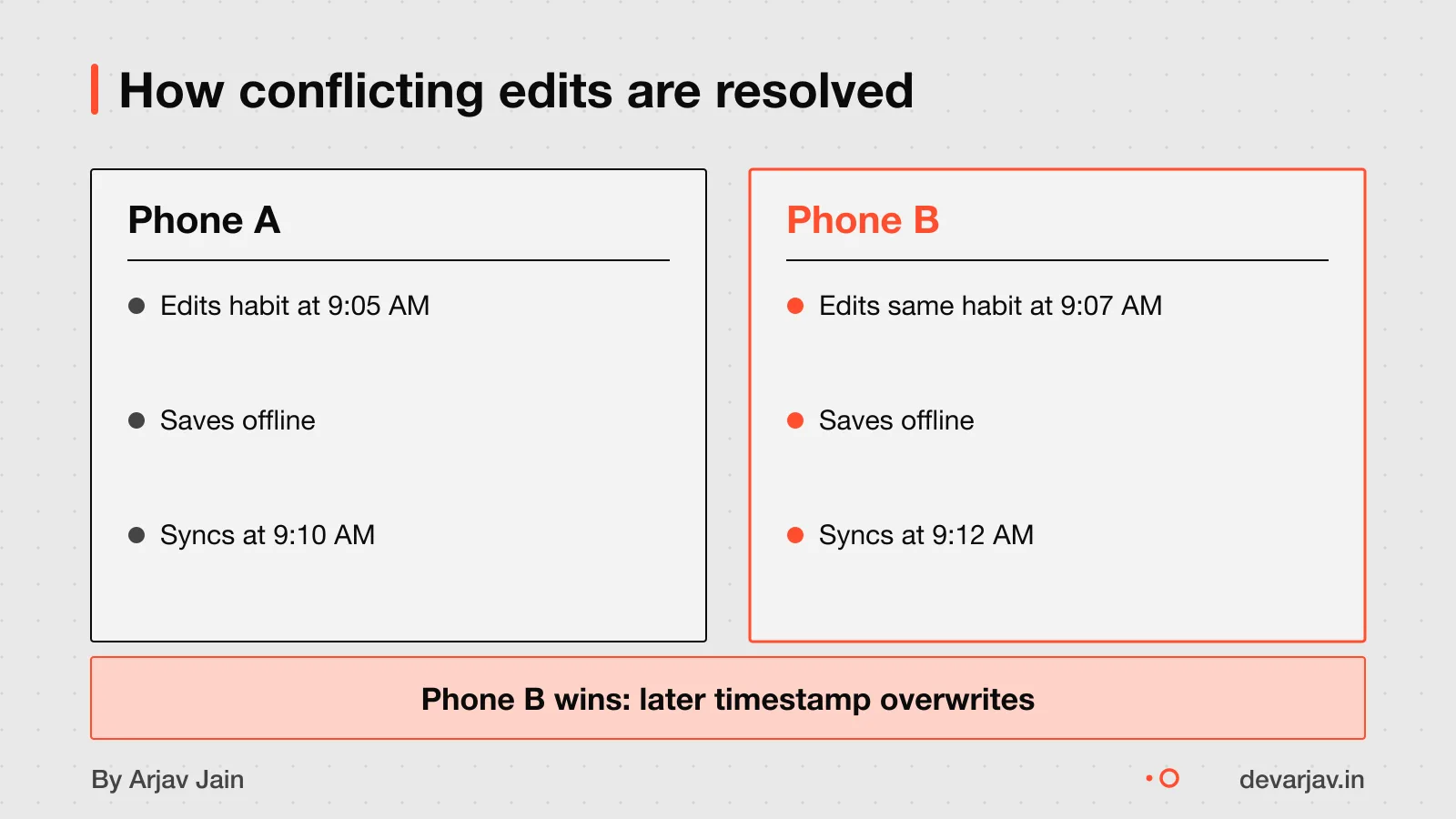
For the same document, it follows a last write wins rule, so the most recent save overwrites the older one. But if edits happen in different fields, Loopin can merge those changes safely. This means you won’t lose your update just because someone else changed another part of the record. This avoids overwriting newer data.
What happens if Google Drive fails
If Google Drive is down, Loopin may show a sync error but keeps your data safe on the phone. As Google Drive API errors like 503 UNAVAILABLE can occur during WriteObject operations. The app does not lose entries because it treats the local database as the source of truth. When Drive returns, sync resumes from where it left off.
Google Drive returns a 403 error if API rate limits are hit. Loopin should catch rate limit errors and retry with backoff. This keeps your data intact and prevents repeated failures.
If your Drive storage is full, you get an error when syncing new entries. Loopin does not overwrite or delete local data. Instead, it keeps new entries on the device until you free up space and sync succeeds.
You must check Drive storage and internet connection yourself to fix sync blocks.
Does Loopin follow India’s DPDP Act?
Loopin stores entries locally first. Data is stored locally first and then sent to the API service.
However, full legal compliance depends on how the app is used and updated over time. The Data Protection Board of India (DPBI) functions as an independent adjudicatory authority for the effective enforcement of the DPDP Act, 2023. For business use or sensitive tracking, you should consult a legal expert to confirm your setup meets current duties.
What you owe users as a data fiduciary
When offline sync is not needed
Offline sync may be overkill for pure read apps with stable connectivity and content that must always be live. If your app works only when online and shows live data, you may not need offline sync at all.
For example, a weather app that pulls daily forecasts does not need offline sync. The data is updated once a day. If your app is similar, mostly read-only with stable internet use, then offline sync adds cost and complexity without real benefit.
It depends on what your users do. If they only view content that must always be fresh, skip offline sync. But if they create or update data in remote or low-connectivity areas, offline-first design is worth it.
Ask yourself: does your user need to act without internet? If not, a simple live feed may be enough.
How to check if a sync design is solid
Ask your developer how the app handles writes when offline and how conflicts are resolved. Offline-first applications require decisions on how read, write, and sync operations are implemented based on the app's requirements. You should also ask if the app uses structured files or raw uploads, and whether it tracks sync status for the user.
To test reliability, turn off Wi-Fi and mobile data, make several entries, then reconnect. Entries should appear in Google Drive without duplicates or losses. Repeat the test with poor signal by using airplane mode and toggling it on and off during sync. A good system retries failed uploads and resumes partial ones.
How to choose a tech stack without a CTO
Have a quote for an offline app? Send it and I will mark what is missing in the sync plan.
Message me on WhatsAppWhen this sync design is not for you
- If your team edits the same data offline on multiple devices, this design can fail. Only one device’s write wins, so others may lose changes. Use a shared live database instead.
- If you need real-time sync, this approach is not for you. Loopin syncs when the device has internet, not instantly. Delays can happen based on network availability.
- This method depends on Google Drive. If Google Drive is blocked, down, or your account is locked, sync stops until access is restored.
- If you uninstall the app, your local data may be lost. This design does not back up data outside Google Drive or your device.
Related reading: How to integrate Google Drive in your app.
Related reading: How to integrate Google Drive in your app, From paper to one platform: a 5-brand, 8-outlet dealership build.
Next step: message me on WhatsApp with what you want to build. No forms, no sales team.
Message me on WhatsAppAssumptions behind the numbers
- Assumes local storage is reliable and cleared only by the user
- Assumes Google Drive API is available when online
- Assumes retry logic handles temporary network failures
The story, chapter by chapter
For Loopin, a habit tracker built in Flutter. Built for ₹0 monthly cost using open-source tools. Figures are as reported by the client and have not been audited.
- writes lost
- 0Local storage first, no data lost even after days offline
- works on 2G
- 2GSyncs when online, works fully offline
- user input for conflicts
- 0Auto-resolves using revision history
What was needed
Save habits offline, sync later
Offline-first from day one
A habit tracker must work anywhere — in villages with poor networks, in clinics that go offline for hours. Regular cloud apps fail here. We needed an offline-first design that stores entries locally and syncs when the net returns.
What happened
Local store, then sync
Save first, sync later
Every entry is first saved in the phone’s local database. Only then does the app try to send it to Google Drive. If the net is off, entries queue. When it returns, all pending entries sync. No write is lost.
What the result was
Zero writes lost, zero user conflict
All data safe, no user action
After days offline, users came back online and all entries synced. No data was lost. Conflicts, if any, were auto-resolved using timestamp-based revision history. Users never had to pick one version over another.
Three things to take away
- Offline-first means saving data locally before trying the network.
- Queue writes when offline and retry when online.
- Use revision history or timestamps to auto-resolve conflicts.
- Test on 2G and in aeroplane mode before launch.
Questions people ask
What happens if two users edit the same habit offline?
The most recent save overwrites the older one. This is called last write wins. If your app needs team use, plan for real-time sync to avoid lost updates.
How much data can Loopin sync via Google Drive?
Google Drive allows up to 500,000 items per folder and a maximum file size of 5 TB. If you store many habits, split them across folders to stay under the limit.
How does Loopin handle large sync payloads?
It can create local query indexes to speed up offline searches. Automatic indexing must be turned on each time the app starts. Enable this to keep performance smooth with large habit logs.
What if Google changes its Drive API pricing?
After 1 May 2026, usage will be measured in quota units. Charges may apply if you exceed the quota request limits, as planned for later in 2026. Monitor your app's sync frequency and payload size as you grow.
Does Loopin notify users of sync errors?
Is the sync system built in-house or with a library?
Can Loopin work without Google services?
How does Loopin ensure data privacy during sync?
Check with a privacy officer or lawyer whether Google Drive encryption meets your data protection needs.