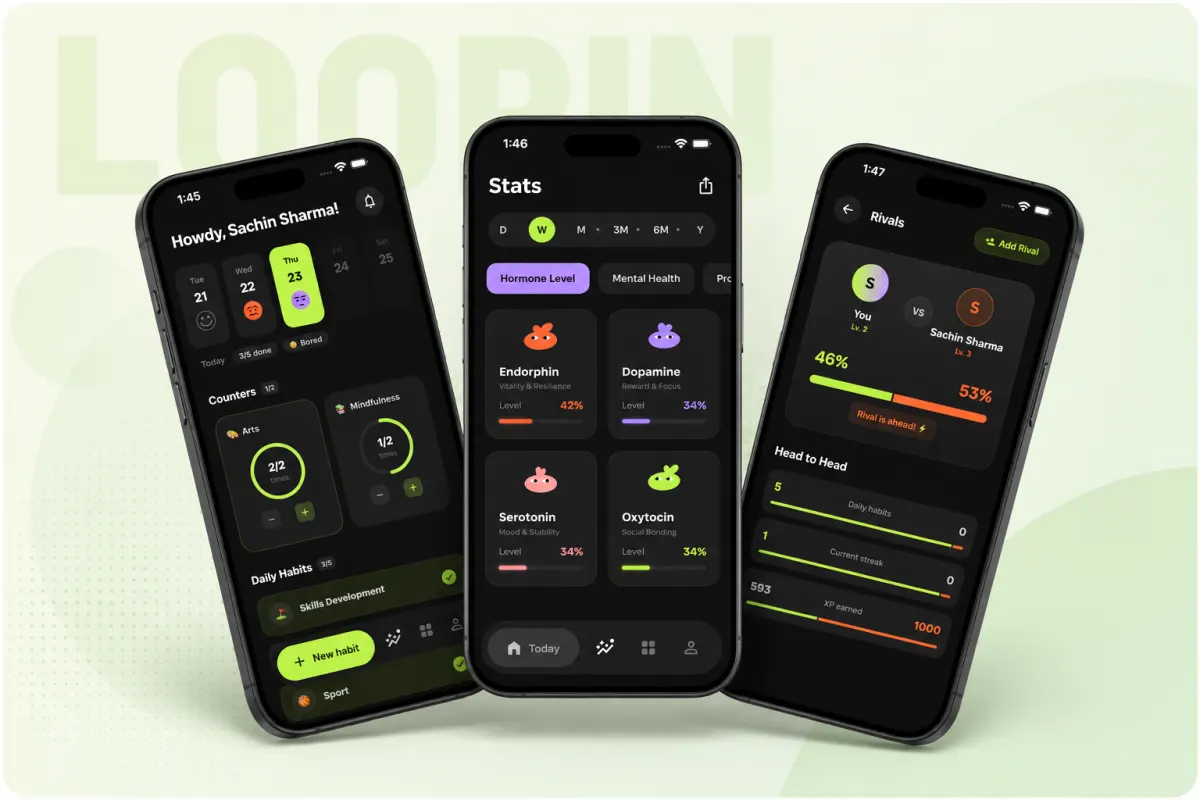
What is Loopin and what does it do?
Loopin is a mobile habit tracker app built with Flutter that helps you build good habits over time. You can track any habit, like drinking water, walking daily, or reading, with no fixed limits on how many habits you add. The app is free to use, with no ads, no in-app purchases, and no annoying notifications. All features are opened for everyone, so you are not pushed to pay for extras. For example, you can set up a morning routine with five habits and track them all in one view. It works like a digital checklist that saves your progress even when your phone is offline.
You might also like Wally: a 4K wallpaper app with smart local caching, another offline-first app by Arjav.

How offline-first apps work without a server
Your data is stored on your phone when offline, not on a remote server. You can view and edit habits anytime, even with no internet. The app uses your phone’s local storage as the source of truth, so it stays fast and works in weak signal areas.
Sync happens in the background when internet returns. Every change you make is saved locally first, then sent to Google Drive later. You do not wait for a network response when logging a habit. This keeps the app responsive, even on slow or spotty connections.
For example, if you mark a habit at a tea stall with poor data, it saves right away. When you reach home with Wi-Fi, it quietly syncs. This design follows the offline-first rule: stay usable without reliable network.
What is Offline-first? In plain words
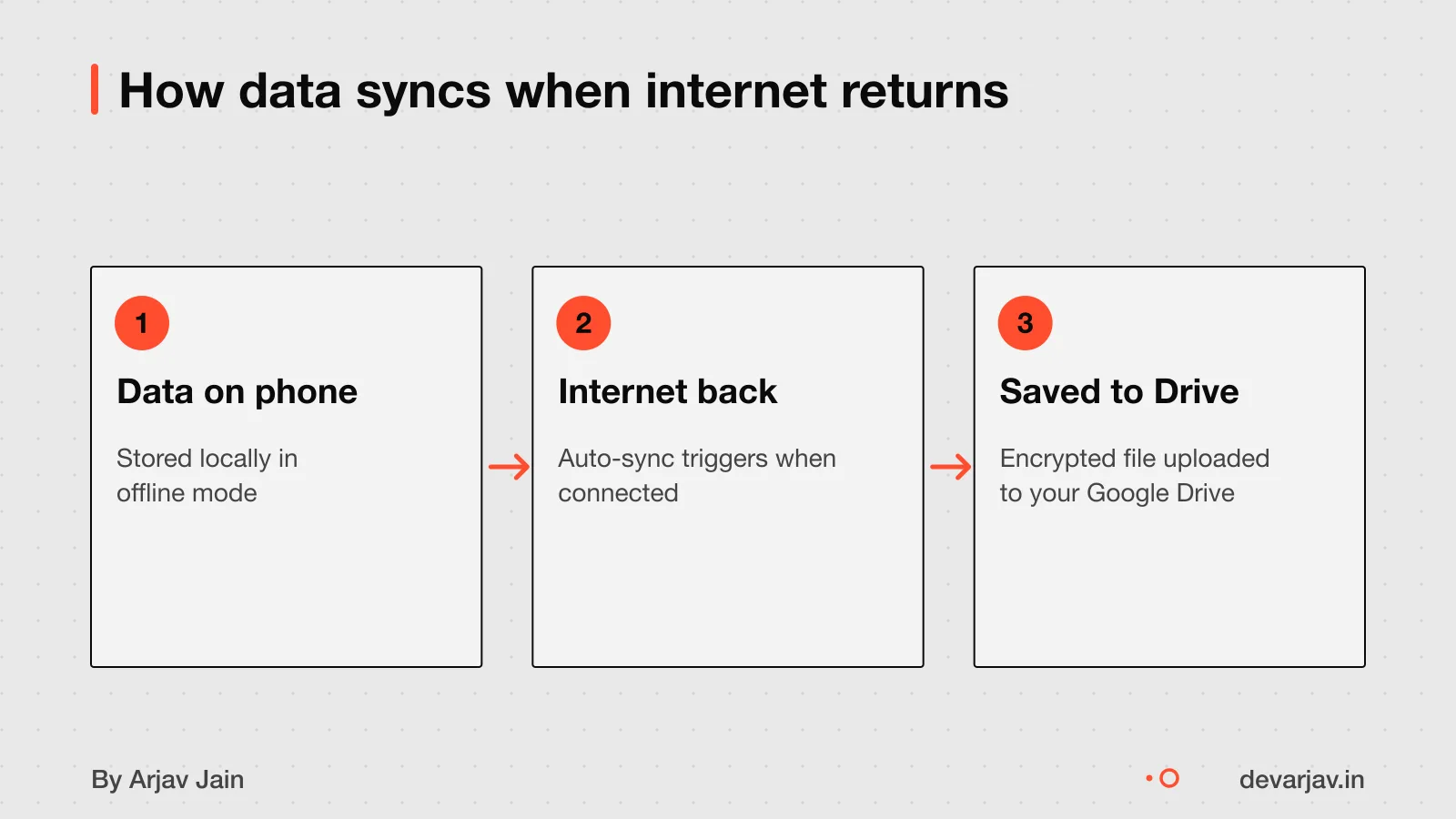
Why use Google Drive instead of a private server?
Using Google Drive means you do not pay for servers or bandwidth. The user’s own Google account covers storage costs. This avoids the need for private servers, cutting both setup and monthly bills. Server costs for a small app are not in the evidence; do not state a range in rupees.
User control improves because data lives in their own Google Drive folder, not on a third-party server. They can see, move, or delete it anytime. You, as the builder, never touch their data. This reduces your legal risk and liability.
Sync uses push-based synchronization where the local data source mimics a replica set of the network data source. The app stores changes locally first, then sends them when the network allows. This supports poor or patchy internet, common in smaller towns. However, it does not support real-time updates or team sharing.
Mobile app development in Flutter, built offline-first when it matters
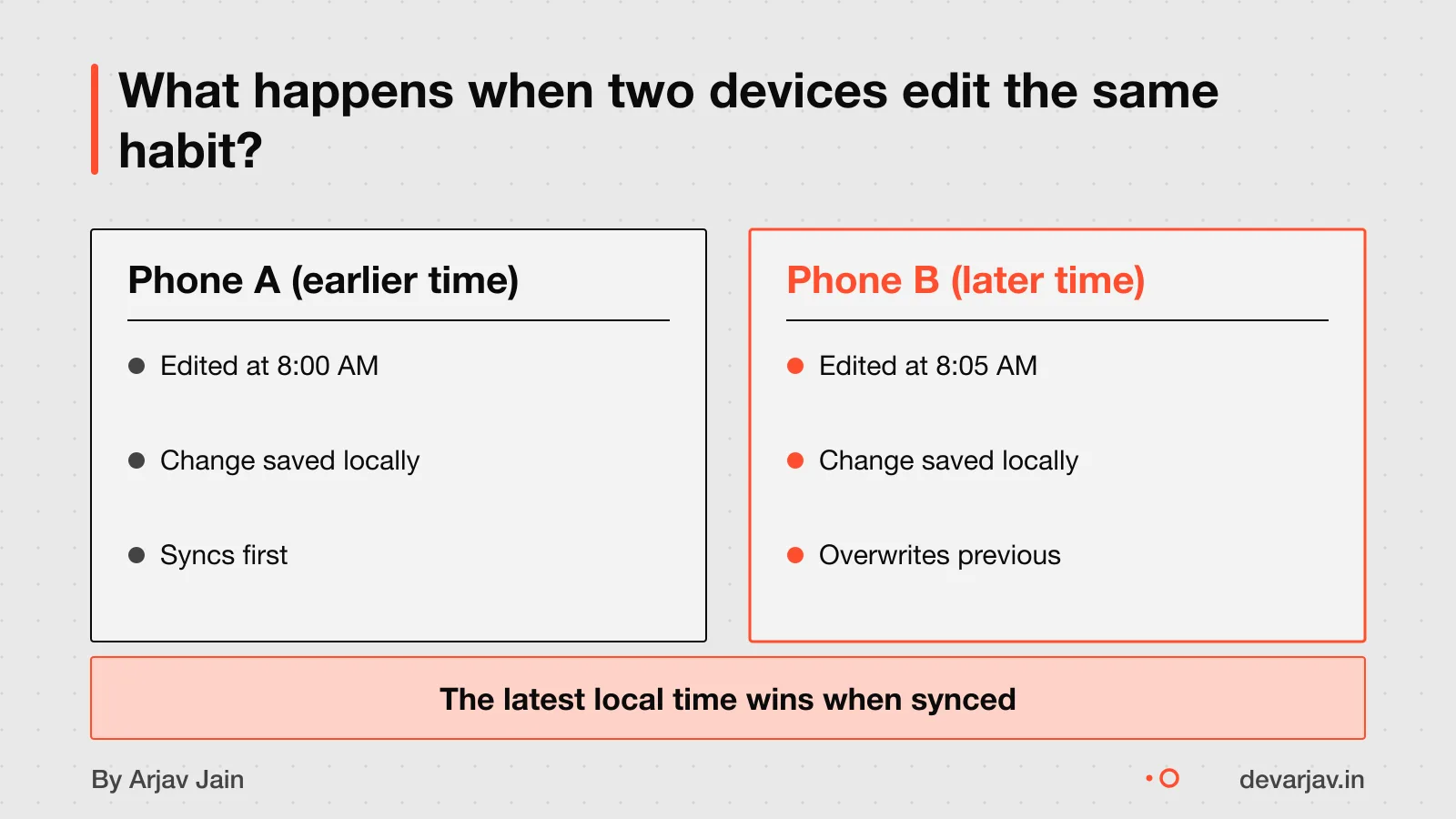
What happens when two devices edit the same habit offline?
If you edit the same habit on two devices while offline, the last change to sync wins. The network data source is the actual state of the application. When both devices reconnect, Drive keeps the data from the device that saved its update later. You might lose the earlier edit if it was not synced first.
You cannot see changes from others until they sync. Loopin does not have real-time updates. Once internet is back, your offline edits will sync to Drive. Until then, each device shows its own version.
For example, if you mark a habit done on your phone offline. Then mark it not done on your tablet offline, only the last one to go online will count. The other change is overwritten.
This means you should avoid sharing a single Google Drive file across devices unless you are sure only one is making changes at a time. There is no merge or warning.
Who owns your habit data in Google Drive?
You retain ownership of your content in Google Drive, including text, data, information, and files you upload, share, or store. Your data stays yours, and Google does not use it for advertising. Loopin does not send your data to anyone, not the developers, not third parties. You can export your data at any time because it is saved in your own Google Drive folder. This gives you full control, and you can back it up or move it as needed. For your rights under Indian law, see the DPDP Act consent for apps.
How secure is your data when syncing to Google Drive?
Your data is encrypted in transit and at rest in Google Drive. This means when your habit data moves from your phone to Google Drive, it is protected like financial transactions online. AES-256 is extremely strong: as of 2023, even a theoretical quantum computer would take 229 nonillion years to break it by brute force. So yes, your data is safe from hackers during transfer and while stored.
This level of encryption means common attacks, like someone intercepting data on a public network, will not work. The system relies on Google’s security, which is well-tested and runs at global scale. However, your Google account becomes the key to access. If someone gets your login, they can see your data unless you use two-factor authentication. The app itself does not hold your data, so it cannot be hacked to leak your habits. You are responsible for your account’s safety.
The exact list of app permissions and how they are used is not documented in the evidence. You should check the app’s permission request screen when installing it.
How much does it cost to build an app like Loopin?
Adding offline-first sync to an existing app costs $15,000 to $60,000. This range covers the added work of storing data locally on the phone and syncing it reliably to Google Drive when the internet returns. Adding offline-first sync takes 4 to 8 weeks.
Costs go up when you add multi-user support or concurrent editing. If two people can edit the same habit, the app must detect and handle conflicts, which adds logic and testing. However, the exact cost impact of team editing is not known.
There is no published cost in Indian rupees for building Loopin. Exchange rates vary, and local development costs depend on the team’s location and experience, which are not documented here. As an estimate, assuming the mid-point of $37,500 and an exchange rate of ₹83 per dollar, the cost could be around ₹31 lakh. But this is not a verified figure.
Adding offline sync increases complexity over a standard online app.
How much more does an offline-first app cost?
Want a number for your idea? Send one line on WhatsApp. I reply with what drives the cost and what to cut.
Message me on WhatsAppWorked example: setting up offline sync for a solo user
Loop Habit Tracker is a mobile app for creating and maintaining long-term positive habits. An offline-first app must remain usable without a reliable network connection.
This setup works under three assumptions. First, only one person edits the data, no team access. Second, real-time alerts or live sharing are not needed. Third, if sync conflicts happen, the user accepts the last-in-wins rule, as Google Drive resolves version clashes by timestamp.
Data encryption in transit meets standard security needs.
When this design is not right for you
You need a server if your app does more than light updates like form submissions, likes or comments. A server is required to support push notifications, as you must set up a provider server to send them in browsers like Safari. This design does not support team editing or shared tasks beyond what one user can sync via their own Google Drive.
Real-time collaboration is missing. If your team needs to edit habits or tasks at the same time, this setup will not work. The last change to sync wins, so concurrent edits can overwrite each other. There is no live update or chat between users.
Push notifications cannot be added later without introducing a server. If you plan to alert users about reminders or updates even when the app is closed, you must build server infrastructure from the start.
Next step: message me on WhatsApp with what you want to build. No forms, no sales team.
Message me on WhatsAppAssumptions behind the numbers
- Sync cost range is ₹15,000 to ₹60,000 (converted from USD)
- Sync time range is 4 to 8 weeks
The thinking
- 01
Problem
Habit tracking in areas with poor network needs to work offline, keep data private, and sync reliably when online returns.
- 02
Decision
Use offline-first architecture with Hive for local storage and Google Drive for sync, not a custom server.
- 03
Why it holds
Building a custom sync backend costs ₹15,000 to ₹60,000 and takes 4 to 8 weeks. Google Drive offers secure, managed sync at no extra cost.
What it includes
- RPG-style habit streaks and scoring
- Hive local storage for instant access
- Atomic sync to Google Drive
- Head-to-head habit rivals
Questions people ask
Can I use Loopin without ever connecting to the internet?
You can use Loopin offline once you set it up online. After that, you can track habits with no connection. Changes sync when the internet returns.
Can I move my data out of Google Drive and use it elsewhere?
Yes, you can export your habit data from Loopin to CSV or SQLite files. You can download these files and use them in other apps. You own your data and can take it out at any time.
What permissions does Loopin ask for and why?
Loopin does not access your contacts, photos, camera, or calendar. It only uses permissions needed for core functions. When you use voice input, audio is sent to Google's Gemini API.
Does Loopin collect or share my data with third parties?
Loopin does not collect your name, email, phone number, or device ID. It does not share your data with third parties. The app does not embed third-party SDKs.
How long does it take to build an app like Loopin?
Building an app with offline-first sync can take 4 to 8 weeks if the backend supports client-generated IDs and idempotency keys. This is for retrofitting an existing app.
What happens if sync fails in poor network areas?
If sync fails, your changes stay safe on your phone. When the internet returns, Loopin sends the updates to Google Drive. No data is lost during offline edits.
Can I add a server later for push notifications?
Yes, you can add push notifications later, but it needs a server to talk to Apple or Android services. This involves backend changes.
Is Google Drive sync reliable in tier-2/3 towns in India?
No evidence confirms how well Google Drive sync works in tier-2 or tier-3 towns. Network quality can vary. Test the app on local networks or consider local sync tools.