What is a coaching institute app?
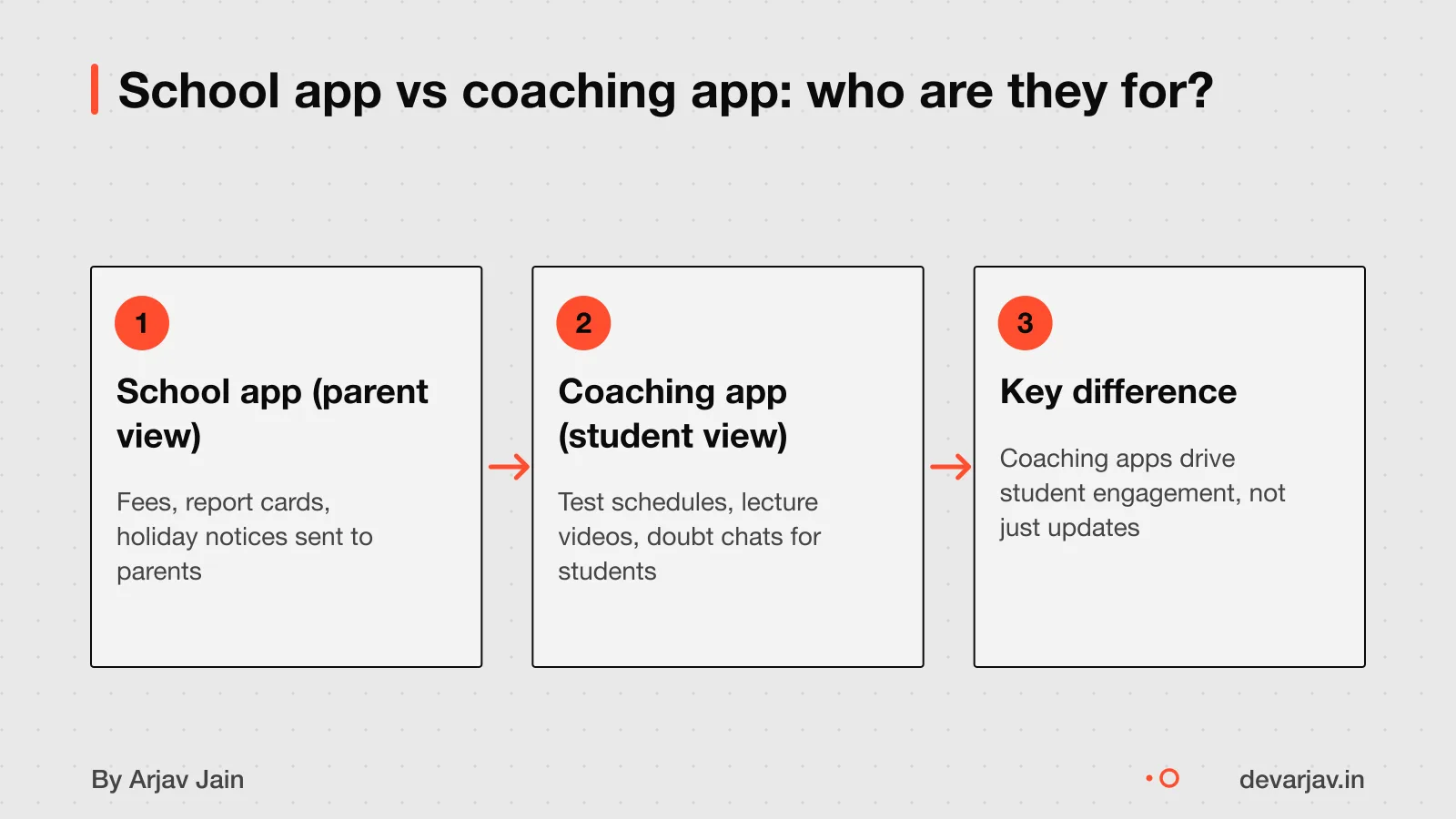
A coaching app helps you manage student batches, tests, doubts and results in one place. Unlike school apps that focus on parent updates and daily attendance, a coaching app tracks progress toward exams like JEE or NEET. It handles test schedules, mock results and doubt-solving queues. This focus on the student lifecycle means you can spot who is falling behind and act fast. For example, a local IIT prep centre can push daily practice sheets, track completion and offer live doubt sessions. School apps, by contrast, stress complete development with sports and arts. A coaching app is built for results, not reports.
If you run a test prep centre, your app must reflect how students move from joining to passing. That is the student lifecycle. Managing it well means higher pass rates and more word-of-mouth admissions.
how to hire for an edtech startup if you need deeper product strategy.
Custom app or ready-made: which is better?
Use ready-made tools like Teachmint or FeeAlert unless your coaching institute has unique needs that they cannot meet. A custom app is only worth it if standard software fails your daily work. Most coaching tasks, messaging parents, sharing study materials, collecting fees and tracking attendance, work well on platforms built for this purpose. These tools save time and cost far less than a custom build.
Building a custom app takes longer and costs more, both upfront and over time. You pay for development, hosting, updates and support. For 95% of coaches, this burden is not worth the benefit. Instead, use WhatsApp-native tools like FeeAlert, which need no app download from parents. This reduces app fatigue, a real issue when parents juggle school, tuition, sports and music classes for multiple children.
If your workflows are standard, stick with ready-made software. It gets you started in days, not months. Only consider custom development when you have tried these tools and found clear gaps they cannot fill.
build or buy decision
How much does a coaching app cost?
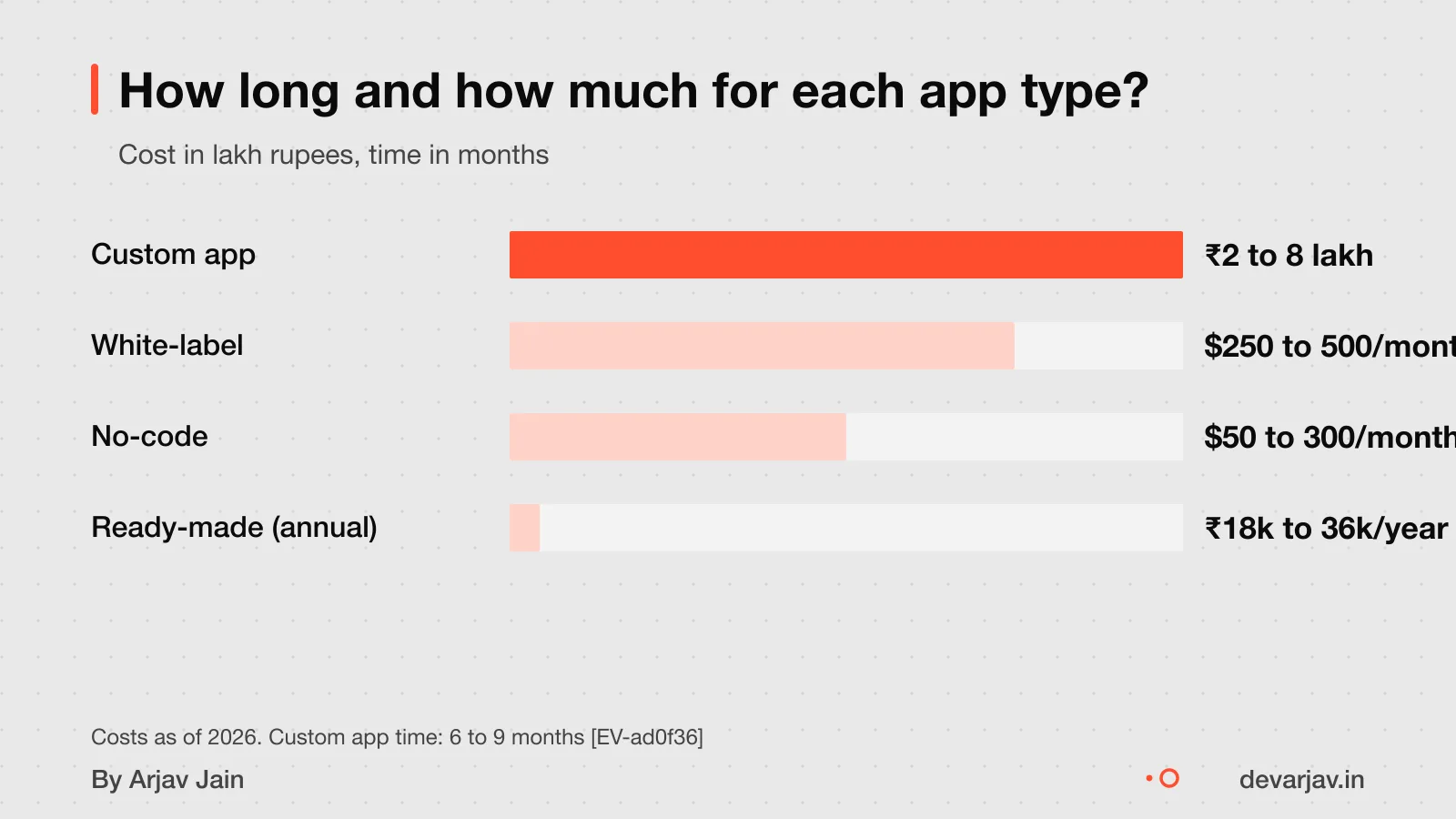
A custom coaching app costs ₹2 to 8 lakh upfront, plus ₹15,000 to ₹25,000 per month for hosting, updates and support. This is for a fully custom app built by an Indian agency. Ready-made tools like Teachmint cost ₹18,000 to ₹36,000 per year. Classplus charges ₹25,000 to ₹50,000 per year as a non-refundable upfront fee. These ready-made platforms include features like attendance, tests and fee tracking.
No-code platforms like Glide or Adalo cost $50 to $300 per month in platform fees. You can build simple apps without coding, but you are limited by the platform’s features. You also do not fully own the app. White-label apps are another option. These are pre-built apps you brand as your own. They cost less than custom apps but more than no-code tools.
This is useful if you are small and want to try digital tools. As your student count grows, costs rise. Custom apps have high upfront costs but can be cheaper in the long run if you need unique features. Ready-made and no-code tools save time and money at first. But they may not grow with your institute.
Compare your needs to the features. If you only need attendance, tests and messaging, a ready-made tool is likely enough. If you need custom workflows like offline access, AI-based doubt solving or integration with your existing systems, a custom app may be worth it. The decision depends on your size, budget and long-term plans.
For a full cost analysis, see the detailed coaching app cost breakdown.
Want a number for your idea? Send one line on WhatsApp. I reply with what drives the cost and what to cut.
Message me on WhatsAppHow long does it take to build?
A custom coaching app takes 6 to 9 months to launch. A no-code tool takes 4 to 12 weeks to build. White-label platforms can take 4 to 8 weeks, including the App Store review. A 24-hour PWA studio can launch your branded app in one day.
Time depends on how much is built from scratch. Custom apps need planning, design, coding and testing. No-code tools use templates and drag-and-drop. White-label platforms only need your brand and content. PWA studios automate the whole process.
For example, if you choose a custom app, the developer must build student login, course access, test modules and progress tracking from zero. Each step takes weeks. With a no-code tool, you pick a template and add your videos and tests. That speeds things up.
A productized PWA studio can build a web app that works like a phone app in 24 hours. Once they have your logo, colours and content. But it offers less control than a custom build.
Freelancer, agency or in-house: which to hire?
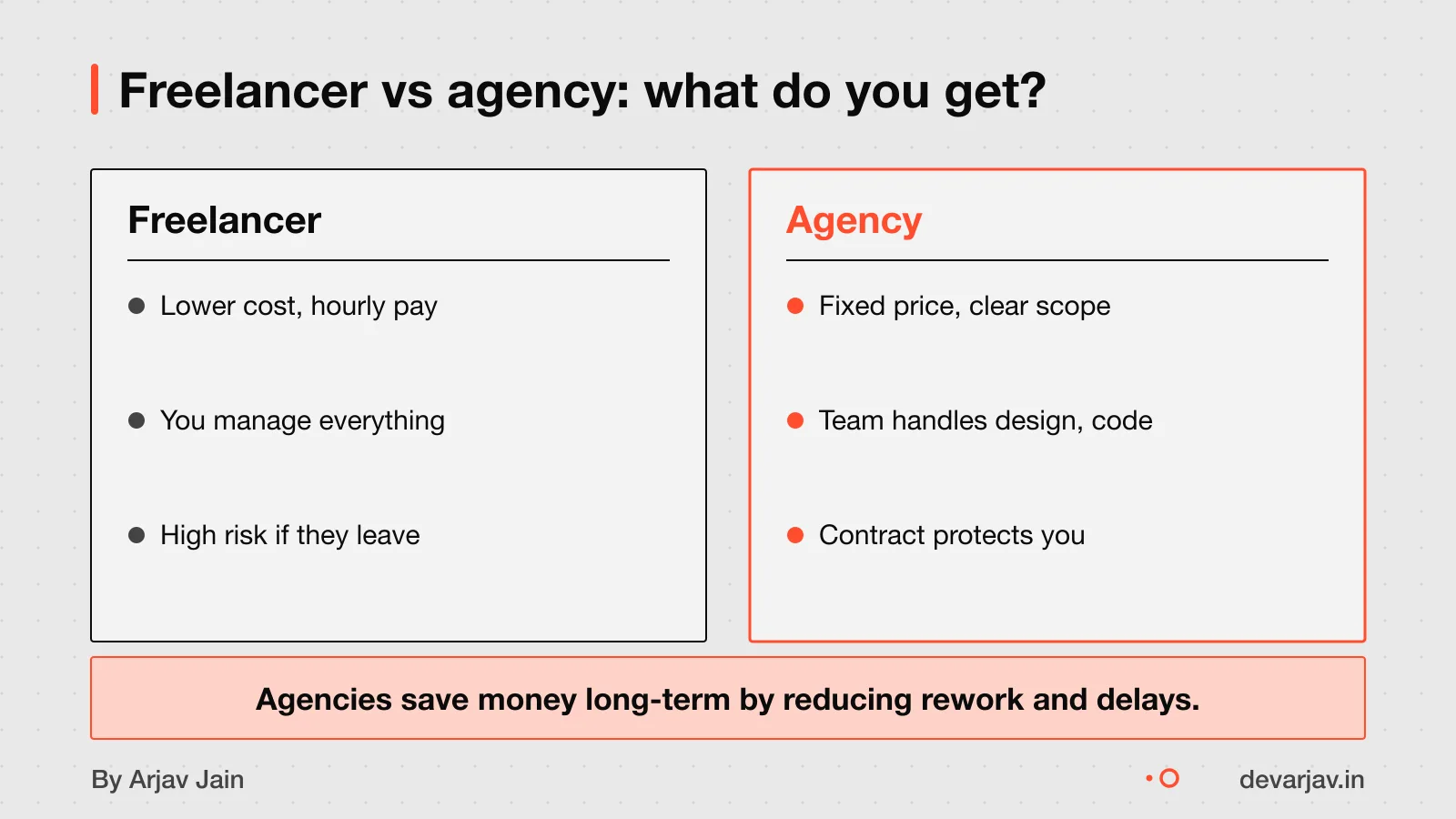
Hire a freelancer if your budget is under $30,000, the scope is small and clear. You or someone on your team can manage the work day to day. You or someone on your team can manage the work day to day. Freelancers are best when you already understand app development basics and only need coding help. For example, if you just want a test series module added to an existing system, a skilled freelancer can do it fast.
Choose an agency if you are a non-technical founder or business owner with a $30,000 to $300,000 project who needs design. Development, QA, and project management handled end to end. You need design, development, testing and project management all handled together. Agencies charge more because they include all roles in one team and one contract. This saves you time and reduces risk. For instance, they will plan the student onboarding flow, design the screens, build the features, test for bugs and guide you to launch.
Building an in-house team only makes sense if your app is your main business, you have funding, and you will keep adding features for years. The first year’s cost is $250,000 to $500,000, even before the first feature ships. In-house teams cost about twice as much as an agency for the first version.
I work directly with clients, with no agency layers. This keeps costs lower and communication clear.
If you are unsure whether you need a freelancer or an agency, start by listing what you want the app to do. Then compare how each option would handle it. You can also read more on how to hire your first developer to avoid common mistakes.
Who owns the code after it is built?
You may not own the code unless the contract says so in writing. Without that clause, the developer may keep the rights, and you cannot switch developers later. The contract must state that all intellectual property (IP) in the app belongs to you after delivery. This means you can hire another team later if needed, without asking the original developer.
Some developers may retain ownership unless specified. To avoid this, insist on a "work for hire" clause that transfers IP to you upon creation.
To protect yourself, add this line to your contract: *“All deliverables are work for hire. All intellectual property rights vest solely with the company (you) upon creation.”* This is based on a model agreement from startupindia.gov.in.
Later, you can verify that you have the full source code and can run it independently how to get and verify source code.
What should the contract include?
Your contract should state that you own the app’s source code and all rights to it. This is called intellectual property (IP) assignment. Without it, the developer may retain rights and could block updates or charge extra later. The contract should clearly say that all code, designs and data you paid for belong to you from day one.
The contract should say the developer is responsible for all applicable taxes on the fees you pay. This avoids surprise tax bills for you later.
Disputes must be settled under Indian law. The contract should say that disputes are within the sole and exclusive jurisdiction. Pick a location that is easy for you to reach.
The contract should allow you to end the agreement with written notice. This protects you if the developer is slow or unresponsive.
Include a warranty clause where the developer promises they have the right to deliver the work and it will not break any laws. Avoid vague terms like "best effort" or "as needed". Every task and handover should be listed clearly.
Have a quote in hand? Send it to me and I will mark what is missing.
Message me on WhatsAppWhen should you not build a custom app?
When should you not build a custom app?
Custom app development may not be suitable if you have not digitised core tasks like fee collection, attendance or test results. A custom app adds cost and delay when simpler tools can help you start.
Instead, use ready-made software to digitise one task at a time. Try Google Forms for tests and WhatsApp for doubt-solving. These are cheaper and faster to use. Once you rely on digital tools daily, you may consider a custom app.
Start small. Fix one problem, like late fee payments, using a simple tool. See if it works. Grow step by step. This way, you avoid wasting money on an app you do not need.
Next step: message me on WhatsApp with what you want to build. No forms, no sales team.
Message me on WhatsAppAssumptions behind the numbers
- You can verify past work by testing apps and calling a reference.
- The developer signs a contract before work starts.
- The app is for a coaching centre, not a school or corporate LMS.
The chapters
A 12-point checklist to vet developers for your coaching app. Each point protects you from common risks: code ownership, contract clarity, tax compliance, and legal fit.
8 min read, in 12 chapters.
01 · Scope
Define what the app must do
Before talking to any developer, write one page: who uses it, the main problem it solves, and three features that must work on day one.
You don’t need designs or a long feature list yet. Clarity here avoids confusion and mismatched quotes later.
Do this One page. Three must-haves. No more.
02 · Budget
Match your budget to the right path
Custom apps cost ₹2–8 lakh and take 6–9 months. Platforms like Teachmint cost ₹18,000–50,000/year.
If your budget is under ₹25 lakh and the scope is clear, a freelancer may work. Larger projects suit agencies.
Do this Use ready-made tools if under ₹50,000/year.
03 · Type
Pick the right kind of help
Freelancers are direct and fast for small scopes. Studios offer design and dev. Agencies bring process and QA.
In-house teams cost more for the first version. Only build in-house if software is your core business.
Do this Ask who actually writes the code.
04 · Past Work
Check shipped apps, not screenshots
Open two shipped apps on your phone. Ask what they would defend and change. Call one past client.
Screenshots prove nothing. Running apps and references do.
Do this Call one past client. Takes ten minutes.
05 · Contract
Sign a written agreement
The contract must say: what’s included, milestone tests, how changes are priced, who owns the code, and what happens if work stops.
StartupIndia provides a standard template. Make sure the repo and store accounts are in your name from day one.
Do this If it’s not written, it’s not included.
06 · Ownership
Confirm code ownership is yours
Indian law says all code paid for vests in you, the client. But many developers ignore this unless forced.
Ask for a clause stating all IP belongs to you on payment. Without it, switching vendors later is hard.
Do this Ask for 'work for hire' in writing.
07 · Tax
Verify tax responsibility
The developer must pay their own taxes. The contract should say so clearly.
If they bill without GST or refuse to issue invoices, walk away.
Do this Ask for a GST-compliant invoice.
08 · Law
Check legal fit
The contract must state that Indian law applies and disputes go to your city’s courts.
Without this, even a signed contract may be useless.
Do this Name your city in the contract.
09 · Payment
Tie payments to tests
Never pay the full amount upfront. Tie payments to milestones you can test.
A small first payment is fine, but hold back the rest until you see working features.
Do this Test before you pay.
10 · Launch
Plan for post-launch bugs
Real users find bugs. Plan for one month after launch with a support budget.
Ask the developer what bug fixes cost and how long they stay involved.
Do this Set aside 10% of total cost for fixes.
11 · Backup
Take backups you control
At the end, you must get the source code, store accounts, and keys in your name.
Also ask for a short doc explaining how it works. Keep one backup of everything.
Do this Backups in your name, not theirs.
12 · Review
Rate and share feedback
After launch, rate the developer publicly. It helps others and keeps them accountable.
If they refused key protections, warn others too.
Do this Leave a public review.
Quick answers
Should I pay the developer in full upfront?
No. Tie payments to milestones you can test. A small first payment is okay, but never the full amount before seeing working software.
Can I switch developers later?
Yes, if the contract says you own the code. Always insist on this before signing.
Do I need a technical co-founder?
Not for the first version. You can hire an independent advisor for one paid hour to ask hard questions of your vendor.
Is a contract really needed for small projects?
Yes. Even small projects fail without a written agreement. StartupIndia offers a free template.
What if the developer disappears mid-project?
That’s why you pay against milestones and keep backups. Also, name your city in the contract for legal recourse.
Are no-code tools good enough?
Yes. For 90% of coaching use cases, a PWA or no-code tool is enough. Platforms like FeeAlert are free for up to 20 students.
How do I verify a freelancer’s past work?
Ask for two shipped apps and one past client to call. Test the apps yourself. Screenshots alone prove nothing.
Questions people ask
Can I build the app myself using a no-code tool?
Yes, if your coaching centre has simple needs like posting notices and collecting fees. No-code tools like Glide work for basic tasks but fail with complex workflows like test scheduling or doubt tracking. For those, you need a custom app built by a developer.
Should I pay the developer upfront, in milestones or hourly?
A clear contract should define each milestone and what counts as done. This protects both you and the developer.
What if the developer stops responding or the project stalls?
Ask your developer how they handle delays before work starts. Agree on a response time and what happens if they stop working. You should also get regular updates and own the code at each step. Without this, you may lose time and money.
How do I verify the app works before paying the final amount?
Test core features like student login, fee payment, test results and the notice board before final payment. Make sure these work on both Android and iPhone. Let your staff or a few students try it first. Only pay when key tasks are confirmed.
Are there hidden costs I should know about?
Yes, recurring costs like server hosting, video hosting, push notifications and a monthly developer retainer add up. These are often not shown upfront. Ask your developer for a full list of ongoing fees.
What legal rules apply when paying a developer?
GST, invoicing and TDS rules apply when you pay a developer. The developer must issue a proper invoice and pay their own taxes. You must deduct TDS if the payment is above the threshold. Check this for your case with a chartered accountant.
Can I switch to a different developer later?
Yes, if you own the source code. Your contract must say that all intellectual property rights belong to you. Without this, you cannot switch developers or make changes later. Check this before signing.
Is a custom app worth it for a small coaching centre?
Most small coaching centres do better with ready-made tools like Teachmint or Classplus. Teachmint costs ₹18,000 to ₹36,000+ per year and Classplus costs ₹25,000 to ₹50,000+ per year. These cover fees, attendance and tests. Build a custom app only if these tools fail your daily work.