What is app rescue and takeover?
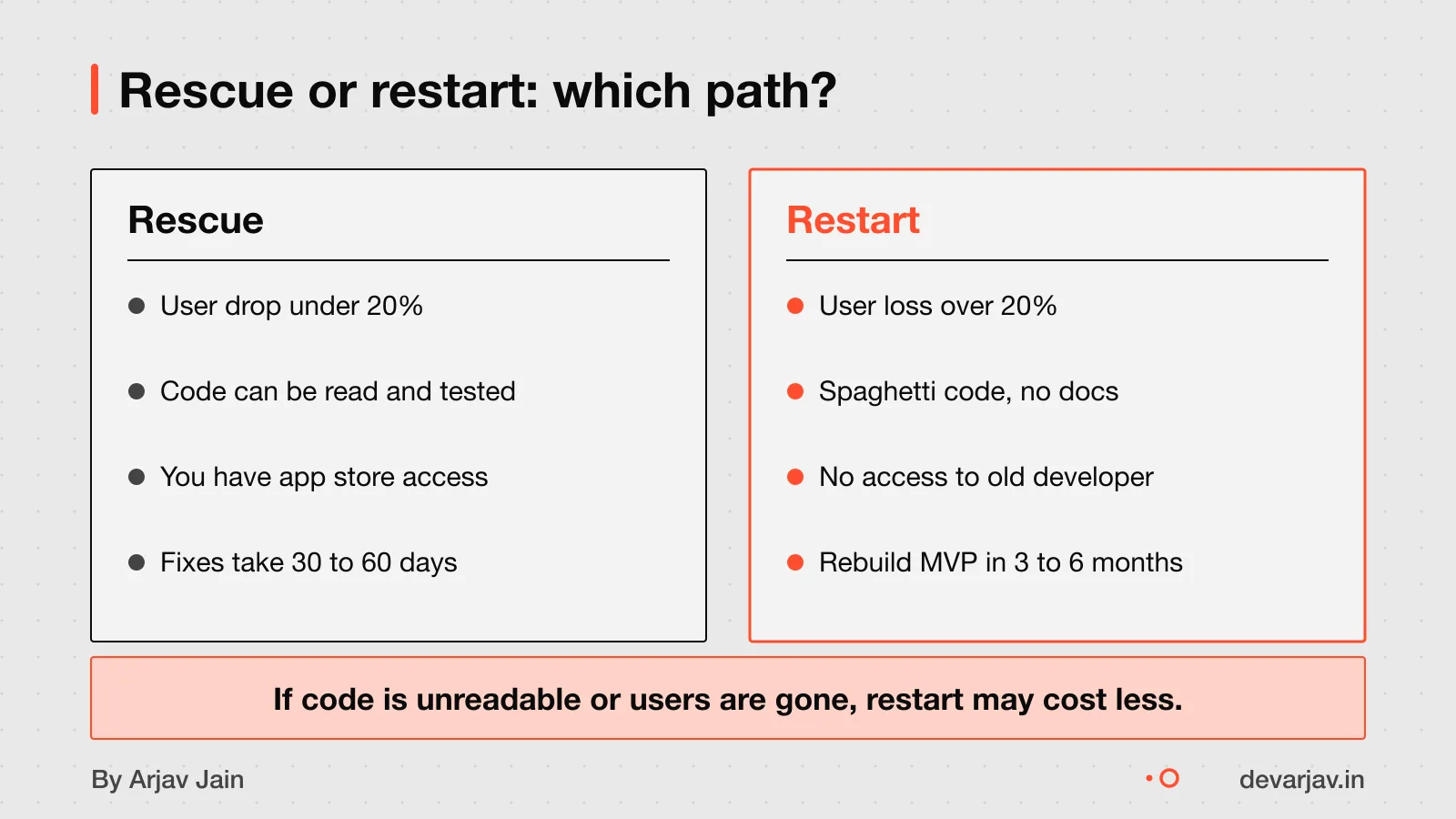
App rescue means saving a broken or stuck app project, not just fixing one bug. It starts with a full audit to check the code, design, and goals. If the app is half-built or the developer left, rescue tries to stabilise it so work can restart. This is different from fixing a single bug, which is quick and narrow. Rescue looks at the whole project: why it failed, whether the code can be trusted, and if the team understood the plan.
For example, a clinic in Indore built an appointment app that crashed every week. The owner thought it was a bug. But the real issue was no handover from the old developer, missing documentation, and unclear features. Rescue meant checking all code, talking to staff, and testing stability, not just patching the crash.
A rescue does not always mean keeping the old code. Sometimes the audit shows it is too messy or insecure. Then, the honest call is to restart, not rescue. The goal is a working app, not saving pride.
How to recover a failed app project explains the full checklist after diagnosis.
Rescue or restart: which is better for your app?
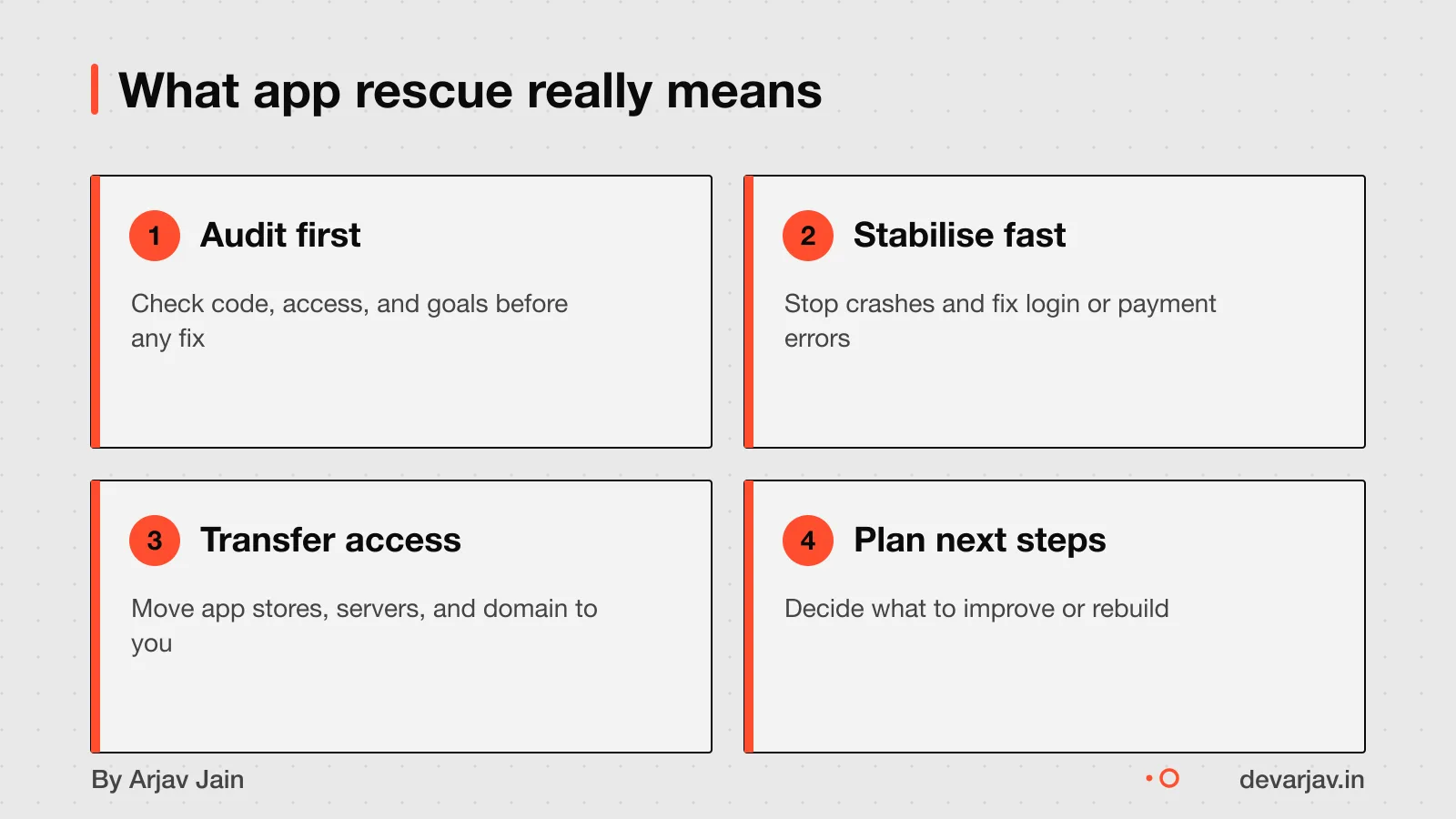
Rescue only makes sense if your app still works and most of its code is organised. If users are leaving fast or the app is broken, a restart may cost less and work better. You should rescue instead of rebuild when the app keeps most of its users and the logic is clear, even if slow or buggy. This means the core features work, and the code can be cleaned up step by step.
Restart is the better choice when user loss hits 20% or more each month, or when the app fails often. If the code is a mess, with tangled logic no one can follow, or the database is broken. Then rescue will take too long and cost more than starting fresh. For example, a school fee portal with no login flow and mixed-up records is likely unsalvageable.
Unsalvageable code means spaghetti logic, a confused database, or security flaws built into the core. These issues cannot be fixed with small changes. Even with full access, a new developer may waste months trying to understand it. In such cases, a clean rebuild with proper design is safer and cheaper in the long run.
If you decide to restart, plan the new system well. System design and architecture helps avoid the same mistakes.
How much does app rescue cost in India?
App rescue costs 30 to 60 percent of a full rebuild, as an estimate. This is assuming the code has structure and no major flaws. A full MVP rebuild costs $10,000 to $50,000. Rescue may cost ₹25 lakh to ₹2.2 crore in India. This depends on the app's state. Rescue is cheaper than rebuild. It reuses existing code and skips early design work. You save on planning, UI mockups, and basic feature coding if the original work was sound.
But hidden costs can add up. You may need to pay for a full code audit first. Some developers charge for this separately. If the code is messy or missing documentation, you might end up paying for partial rewrites anyway. Also, if the original developer did not hand over access, you could face extra fees. These fees are for regaining control of app stores, servers, or domain names.
As an estimate, assuming the code is usable and access is complete, the cost stays lower than a fresh build. But if the app has deep flaws, the savings shrink fast.
Want a number for your app? Send one line on WhatsApp. I reply with what drives the cost and what to cut.
Message me on WhatsAppHow long does app rescue take?
App rescue usually takes 30 to 60 days to stabilise your app. Yes, stabilisation in under 60 days is possible. One app with 8,000 users was stabilised in 45 days, allowing major partnerships to launch. The exact time depends on how broken the code is, how much documentation exists, and whether the team left cleanly. For example, a food delivery app in Jaipur was fixed in 45 days after the original developers left. If core features work but crash often, you may see progress in weeks. If the backend is missing or passwords are lost, it can take longer. The goal in this phase is not new features but steady performance.
Steps in app rescue and takeover
The rescue process starts with an audit, then moves to stabilisation, and ends with a full transfer of access. During the audit, I check your app’s code, design, and goals to see what works and what does not. This helps decide if rescue is better than a restart.
If we go ahead, the next step is stabilisation. I fix crashes, update outdated tools, and make sure the app runs smoothly again. This is done in parallel with your current team or after they have left. The goal is to get the app ready for handover.
Then comes the transfer. To move the app safely, both the original and new Google Play Developer accounts must be active. The target account (mine or your new developer’s) must be added as an owner in the Google Developers Console. I also need access to Google Analytics so user data continues to flow. Google reviews the request and replies within 2 working days.
Next step: message me on WhatsApp with what you want to build. No forms, no sales team.
Message me on WhatsApp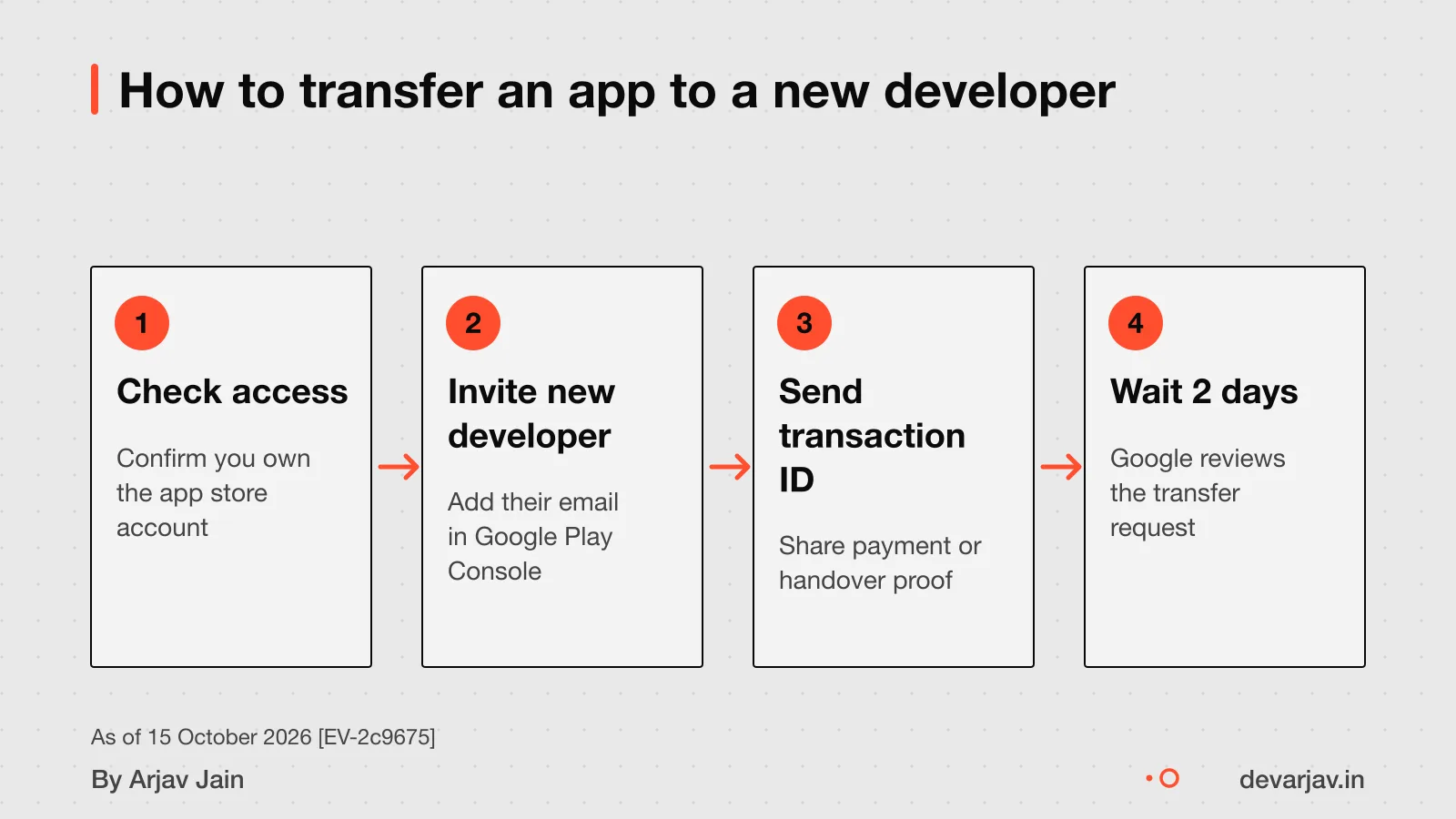
Why do app projects fail in India?
Running out of cash is a common reason for app failure. Teams often build too many features before checking if customers want them. This happens because founders focus on what looks impressive, not what users need. For example, a local food delivery app added chat, loyalty points, and live tracking before testing basic orders. It ran out of funds with no paying users.
Building for engineers, not customers, is the core problem. You may think more features mean a better app. But most users only use a few. A clinic app that added video calls, AI reports, and billing, before validating demand, failed because doctors just wanted appointment reminders.
They assume users will love complexity. But simple apps that solve one problem well grow faster. Start with the smallest version that works.
Running out of cash plays a major role. Even good ideas fail if money runs out before income starts. Founders often spend on tech when they should test demand with a basic tool or WhatsApp.
Automate paper and WhatsApp work to fix your business process before rebuilding the app.
When app rescue is not worth it
Do not attempt app rescue if the code is genuinely beyond saving or technical debt is so catastrophic that rescue costs more than rebuild. In these cases, rescue might cost more than rebuild while delivering worse outcomes. Spaghetti logic, where code runs in circles no developer can follow, is a sign of unsalvageable code. A nonsensical database schema is a sign of unsalvageable code. Fundamentally flawed security is a sign of unsalvageable code.
When the foundation is broken, patching it wastes money. A full audit will show if your app is in this zone, if so, plan for restart, not rescue.
How to start the app rescue process
The first step is to confirm both the original and target Google Play Developer accounts are active. You need the registration transaction ID from the target account owner’s email, under 'developer registration fee'. Share this ID with the original developer so they can start the transfer. The target account must then accept the request. Begin only when both accounts are set and the ID is ready.
Related reading: App rescue and takeover service.
Assumptions behind the numbers
- Rescue costs 30–60% of rebuild assuming code is structured and not deeply flawed.
- App rescue stabilises in 30–60 days based on PixelForce case studies.
- Developer account access is available or recoverable for transfer.
What is in it, and what is not
Fix your app instead of restarting from scratch. Get audit, stabilisation, and full handover — all in 30 to 60 days.
- 01Technical audit
Full review of code quality, dependencies, and architecture to decide what can be fixed.
- 02Stabilisation
Crash fixes, performance tuning, and patching critical bugs so your app runs again.
- 03Transfer support
Move app ownership to your Google Play and App Store accounts with full access handed over.
- 04Post-rescue support
Agreed period of bug fixes and guidance after launch, not open-ended maintenance.
How it runs: milestones you can test
- 1Audit done
You can test: Written report on code health and rescue plan shared.
- 2Stability achieved
You can test: Critical bugs fixed, app runs reliably on test devices.
- 3Transfer complete
You can test: App ownership moved to your developer accounts.
- 4Post-rescue support
You can test: Agreed fixes and guidance period begins.
Right for you if
- Your app has logical structure but poor performance or bugs.
- You need to stabilise quickly — within 60 days — to avoid business loss.
- You own the current developer accounts or can regain access.
Look elsewhere if
- Code is spaghetti logic with no clear structure.
- Major security flaws or broken database design exist.
- You’re losing 20% or more users monthly due to app issues.
How it is priced
As an estimate, assuming the code has structure and no major flaws, rescue may cost 30–60% of a rebuild. Exact pricing comes after audit and scope. A lump sum on a vague brief is avoided to protect both sides.
Questions to ask before you sign, with anyone
- Can you show past rescue reports?
- Will I own the app after rescue?
- What happens if we stop mid-process?
- Do you work with my app’s tech stack?
- How do you handle app store transfers?
Quick answers
How long does app rescue take?
Between 30 to 60 days, depending on complexity. One case took 45 days to stabilise for major partnerships.
Is rescue cheaper than rebuild?
Yes, rescue typically costs less and delivers faster results by stabilising operations.
Can you take over any app?
Only if the code is structured and salvageable. Spaghetti logic or deep flaws may require a restart.
Do I keep my app ratings?
Yes. All data including ratings and users move with the app during transfer.
What if I don’t own the developer account?
Both original and target accounts must be active for transfer. Google approves requests in two working days.
Will I own the rescued code?
Yes. Repository and store accounts are transferred to your name from the start.
Can I switch developers later?
Yes, if both developer accounts remain active and follow Google’s process.
Questions people ask
What should I check before hiring a developer for app rescue?
Ask the developer to review a small part of your code first. This shows their skill in spotting issues and planning fixes.
How do I know if my app's code is salvageable?
Salvageable code has structure but needs fixes, while spaghetti code with no logic is hard to save.
What if the original developer is not responding?
You can still transfer the app if you control the original Google Play account. If not, you may need legal help to regain access or ownership.
Does app rescue include updating features or just fixing bugs?
App rescue focuses on stabilising the app and fixing core issues. New features come later, as a separate phase after the app is working well.
Can a rescued app be moved to another country's app store?
You can transfer the app to another Google Play Developer account. Check this for your case with a chartered accountant or lawyer.
Who gets the app's ratings and reviews after takeover?
All ratings, reviews, user data, and subscriptions stay with the app after transfer. The new developer takes over everything linked to the app.
What legal agreement should I sign for app rescue?
Your contract should clearly state that you own the code and that user data stays private. Since Indian software contracts can be tricky, check this for your case with a lawyer familiar with tech agreements.