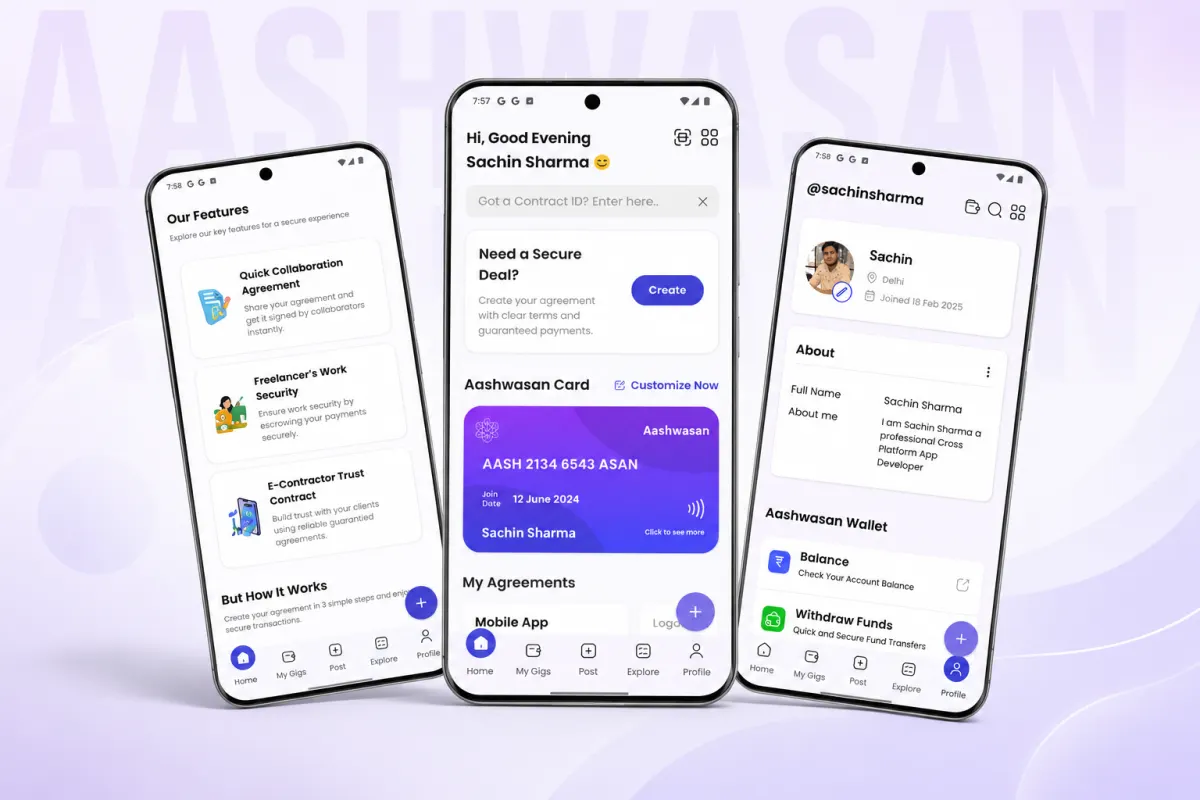
What is Aashwasan and what problem does it solve?
It helps freelancers and small service providers create contracts, track orders in real time, and communicate securely with clients. The app solves the pain of managing informal, scattered work agreements, like those done over WhatsApp or paper, by bringing them into one structured tool. For example, a local photographer can send a client a digital contract, mark milestones, and get notified when the client views or signs it. It includes integrated PDF handling and push notifications to keep gigs on track across devices. This makes it easier for solo professionals to act like organised businesses.
Legease: AI contract analysis in a Flutter app

Is Aashwasan a real app or just a demo?
Aashwasan is a real app built by Sachin Sharma using Flutter and Firebase. It is not a government scheme, despite the similar name. Aashwasan has no activity yet for the period October 2026. You cannot try it online, as the live demo runs only on a local server at `http://localhost:4000/chat`. This means you can view the chat feature if you run the code yourself, but there is no hosted version available for public testing. It is not a client project by Arjav Jain or linked to any business use in India.
How is Aashwasan different from WhatsApp or email?
Aashwasan is not just chat. It replaces loose messages with clear contracts and live tracking. If an electrician and homeowner use WhatsApp, they may misagree on work scope or price. Aashwasan offers a platform for contract creation and real-time order tracking.
It adds structure. You create a contract once, update its status, and attach proof like photos or payments. Chat apps let messages get buried. Aashwasan keeps everything linked to the job.
For example, if the electrician finishes wiring, they mark it done in the app. The homeowner gets a prompt to review and confirm. No scrolling through 50 messages to find what was promised. The full history stays in the contract log.
This matters when trust is low or work is complex. A shop owner hiring a cleaner each month can reuse the same template, adjust dates, and track each visit without new chats every time.
What features does a property management app need?
What tech stack was used to build Aashwasan?
Aashwasan was built using Flutter for the frontend and Firebase for the backend, along with Provider for state management. Flutter lets you build one app that works on both Android and iOS, saving time and effort. Firebase handles data storage, user authentication, and real-time updates, so developers can focus on the app logic instead of setting up servers.
This means Aashwasan is cross-platform: it runs on both Android and iOS phones from a single codebase. Using Flutter and Firebase together is a common choice for early-stage apps that need fast development and real-time features like live contract updates.
Firebase or a custom backend?
What is the core workflow of Aashwasan?
This flow acts like a checklist for both parties, making it clear what stage the work is at. As work progresses, the freelancer can mark it as in progress and later as delivered. The final step is marking it as paid, closing the loop.
Each state change triggers actions. For example, moving to "accepted" may lock in the scope and start the clock. Moving to "delivered" can prompt a notification to the client. The app uses push notifications to keep both sides informed. While the exact rules for each transition are not documented, designing these early helps avoid confusion later.
You should build the state logic first. Define what each stage means and who can change it. This becomes the backbone of your app. Without it, features like tracking or notifications lack context. Use a simple list or flowchart to map your own service’s steps before coding.
A clear agreement flow reduces missed steps and builds trust. For a small plumbing or design job, this structure replaces back-and-forth messages with a shared timeline. It turns vague promises into tracked progress.
Want to map your agreement workflow? Send one line about your service. I'll reply with the key states and what to build first.
Message me on WhatsApp
How does Aashwasan work when offline?
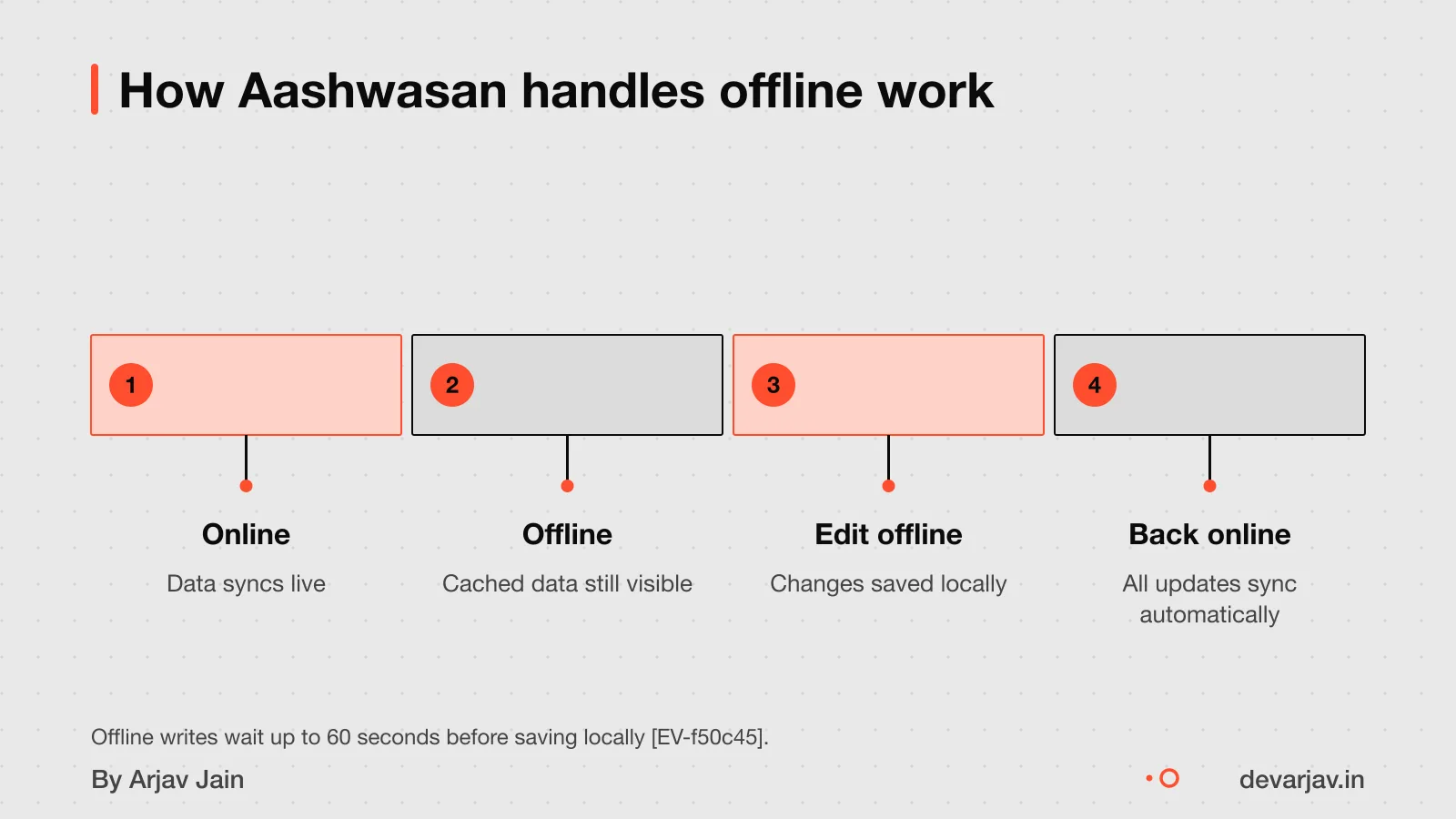
Yes, Aashwasan works offline. Users can see old data because Firebase saves it on the device once loaded. You do not lose access even if you restart the app or phone.
Users can also make updates while offline. The app queues these changes locally. This includes adding new contract terms or marking a task as done.
Changes sync automatically when the connection returns. The app sends all queued writes to the server in order. On Android, Firebase closes the connection after 60 seconds of inactivity if there are no active listeners, pending writes, or onDisconnect operations.
For example, a plumber in a low-signal area can view a job contract. Update the status, and the system will sync both actions once back online.
Firebase also lets the app check real-time connection status using a special database path: /.info/connected. This helps show users when they are offline.
Note: This relies on Firebase’s built-in offline support. How long data stays on the device if the app is uninstalled is not documented.
Why Firebase might be chosen for a contract app
Firebase can speed up development of a contract app by handling the backend work for you. It offers real-time updates, so both parties see contract changes instantly, without waiting for a refresh. This is useful when trust and transparency matter, like tracking gig work progress.
It saves time because you do not have to build user login, databases, or file storage from scratch. Firebase provides ready-made tools for these, so developers focus on the app’s core features. For a small team or solo builder, this means launching faster and spending less on setup.
This makes sense when you need a working prototype quickly and do not expect massive scale at first. It works well for local service apps, like plumbing or tutoring, where growth is steady and budgets are tight.
However, Firebase runs only on Google Cloud Platform, which can lead to vendor lock-in. Once your app is built on it, switching later may take extra time and cost. So it suits projects where speed now matters more than long-term flexibility.
If you are unsure whether Firebase fits your app, compare it with other backends like AWS Amplify [Firebase or AWS Amplify?].
Downsides of using Firebase
Firebase has cost risks, data lock-in, and technical limits you should know before choosing it.
Firebase pricing is usage-based and can become expensive as your app grows, with costs hard to predict. You pay for reads, writes, storage, and downloads, so a sudden spike in users could mean a large bill.
Your data may be locked into Google’s ecosystem because Firebase runs only on Google Cloud Platform, which can make switching providers difficult. If you later want to move, you’ll need to rebuild much of your backend.
Firebase does not work in countries where Google services are blocked, such as China. It offers only NoSQL databases such as Firestore, which have limited query flexibility and a write limit of once per second. There is also a 1MiB limit per document and a 10 MiB cap on API request size.
These limits may not matter for small apps, but they can block growth if not planned for early.
How long does it take to build an app like Aashwasan?
The time to build an app like Aashwasan is not known from the evidence. As an estimate, assuming a solo developer working part-time on a Flutter + Firebase app with core contract states. Offline support, it could take 3 to 6 months. This depends on the number of screens, complexity of state logic, and time spent testing. Key factors that affect your timeline include the clarity of the workflow. The need for real-time sync, and whether you reuse existing templates or build from scratch. For your own case, list the must-have features first, then group them into phases. A simple version with just proposal, acceptance, and tracking might take 6 to 8 weeks.
How long does it take to build a hospital management app?
How user roles and permissions are handled (best practice)
The evidence does not specify who can edit contracts in Aashwasan. This is general advice. This keeps changes controlled and clear. The evidence does not specify what happens to contracts after acceptance in Aashwasan. This is general advice.
The evidence does not specify who can view contract status in Aashwasan. This is general advice. Real-time updates help both sides stay on the same page without extra calls or messages.
How to set access safely? The evidence does not describe role-based access control in Aashwasan. This is general advice. For example, only admins can add new team members. This reduces errors and misuse.
As a best practice, define roles early in your app design. Match them to real-world jobs: one person drafts, one approves, one tracks delivery.
Since the exact roles in Aashwasan are not documented, this advice follows standard app security patterns. You should confirm your app’s access rules with a developer who can implement them correctly.
What notifications should a contract app have?
A contract app should send notifications for key state changes like when a contract is proposed, accepted, marked in progress, or delivered. Both parties should get alerts so each stays informed. This keeps trust and avoids delays.
To avoid spam, let users choose which updates they want. Group alerts by contract and use clear titles so nothing feels overwhelming. For example, a cleaner and client both get a single alert when the job moves to "in progress", not multiple messages.
Since Aashwasan’s notification system is not documented [unknown], these are common best practices for contract apps. You can check what triggers matter most by listing the steps in your service workflow.
How disputes and version history are handled (best practice)
You can track changes to contracts only if the app is built to save old versions. It is not documented whether Aashwasan stores old contract versions [unknown]. In best practice, every update should create a new version with a timestamp and user ID, so you can see what changed and when.
Only authorised users should change contract terms. It is not stated who can edit agreements or how permissions are set in Aashwasan [unknown]. Normally, the party who created the contract can revise it before acceptance, but once signed, changes require mutual consent.
Clear version history helps during disagreements by showing the exact terms both parties agreed to at any point. It is not described how Aashwasan handles disputes or audits [unknown]. As a standard, apps should keep an immutable log of actions, who did what and when, to support fair resolution.
Without this, you risk confusion over terms. Always design your own app to log every change, even if Aashwasan’s current version does not show it.
What happens to your data if Firebase shuts down?
Migrating data from Firebase may be more complex and slower than with a standard SQL database. This means migration may take more time and technical work compared to a simple SQL database. As a result, you should plan for extra effort and cost if you ever need to leave Firebase. While tools exist to export Firebase data, they often require custom scripting and testing to ensure nothing is lost. If you are starting a business-critical app, ask your developer how they will handle data portability and backup from day one.
Build or buy a property management app to help weigh long-term risks.
Does Aashwasan handle payments?
No, Aashwasan does not handle money transfers. It does not integrate with UPI, cards or any payment gateway. The app is not built to send or receive payments.
Instead, it tracks the status of work: whether a contract is proposed, accepted, in progress, delivered or paid. You and your client see the same live update on progress, like a shared checklist.
For example, once you mark a task as delivered, the client sees it right away. But the actual payment must happen outside, by UPI, cash or bank transfer, and then recorded manually.
This keeps the app simple and avoids complex financial rules. It also means you must confirm payment receipt yourself.
Since the evidence does not mention payment features, and no founder fact states otherwise, we rely on the absence of such claims in public sources.
How to check if Firebase fits your app
Use this checklist to see if Firebase suits your app idea.
- Do you need real-time sync? If both parties must see updates instantly, like live contract status changes, Firebase supports this out of the box. If not, a simpler backend may save cost and complexity.
- Can you accept vendor lock-in? Firebase runs only on Google Cloud Platform, making it hard to switch providers later. If you plan to change platforms later, avoid Firebase.
- Is cost predictable? Firebase pricing depends on usage, not a fixed fee. Costs can rise quickly with more users or data. If your budget is fixed or you expect fast growth, this model may be risky. Consider a flat-rate hosting option instead.
Worked example: building a similar app
As an estimate, assuming 5 agreement states, 3 user roles, and no payment integration, building a similar app takes 12 to 16 weeks. This timeline depends on the developer's experience, feature scope, and testing depth. A solo developer working full-time may move faster, but adding payments or complex permissions will extend the time.
The main assumptions are: the app uses Firebase for real-time sync and auth, Flutter for cross-platform support, and has no third-party payment gateways. We assume the developer is familiar with both tools and that offline sync is built using Firebase's local persistence.
For apps in low-network areas, factor in extra time for offline testing due to Firebase closing inactive connections after 60 seconds.
However, do not cut corners on data validation or user testing, bugs in contract states can break trust. Always build a small prototype first to test the core flow.
When is this approach not right for you?
When is this approach not right for you?
- You serve users in China or regions where Google services are blocked. Firebase does not work in countries like China where Google services are restricted. If your business or clients operate there, you will need a backend that runs on local cloud providers.
- Your data structure needs complex queries or transactions. Firebase only supports NoSQL databases such as Firestore and has limited query flexibility. If your app requires joins, roll-ups, or strong consistency across multiple records, a custom backend with PostgreSQL or MySQL may be better.
- You expect high write volumes or large documents. Firebase limits writes to one per second per document and has a 1 MiB document size cap. If your app logs frequent updates or stores large files, these limits will slow you down.
- You want to avoid long-term vendor lock-in. Firebase runs only on Google Cloud Platform and makes it hard to move your data later. If you plan to switch providers or use hybrid cloud setups, a portable stack like Node.js with a standard database gives more control.
- Cost predictability matters to you. Firebase pricing is usage-based and can spike with growth, making it hard to forecast. If your budget is fixed or you are in early validation, a simpler backend or off-the-shelf tool may be safer.
Next step: message me on WhatsApp with what you want to build. No forms, no sales team.
Message me on WhatsAppThe thinking
- 01
Problem
Gig work and contracts run on scattered chats and promises, with no shared record of who agreed to what.
- 02
Decision
Use Firebase for authentication and real-time data, and spend the build time on the agreement and order workflow instead.
- 03
Why it holds
Real-time order tracking and secure messaging are solved problems on a managed backend. The product's value is in how an agreement moves through its states, so that is where the effort went.
What it includes
- Contract and gig management in one app
- Real-time order tracking
- Secure communication between the two sides
Questions people ask
Why use Firebase for a contract app?
Firebase saves time on real-time sync and user authentication, so you can focus on the agreement workflow. But it can lead to vendor lock-in and runs only on Google Cloud Platform. For long-term control, weigh these trade-offs early.
Does Aashwasan handle payments?
No, Aashwasan does not handle payments. It tracks agreements and their status, not money transfers. You will need a separate payment method like UPI or a card gateway for actual transactions.
Can I use Aashwasan for my business?
Aashwasan is a government maternity initiative by the Ministry of Health, not a reusable app. The name is shared with a personal project, but neither is available for your business use. Build your own instead.
What happens to my data if Firebase shuts down?
Migrating data from Firebase can be complex and slow compared to SQL databases. Plan to export your data regularly. For safety, design an exit strategy before you fully depend on it.
How do I start building a similar app?
Start by defining the agreement states and how they change, like proposed, accepted, and paid. This flow becomes the core of your app. Then add real-time sync and offline support step by step.
Is the source code public?
No, the GitHub repository for Aashwasan shows no activity for this period. The app is not open source.
What platforms does Aashwasan support?
Aashwasan supports iOS, Android, Web, and Desktop platforms. This lets users access contracts from phones, tablets, or computers, depending on their needs.
How are contract versions tracked?
Contract version tracking is not documented for Aashwasan. To avoid disputes, build in version history from the start.