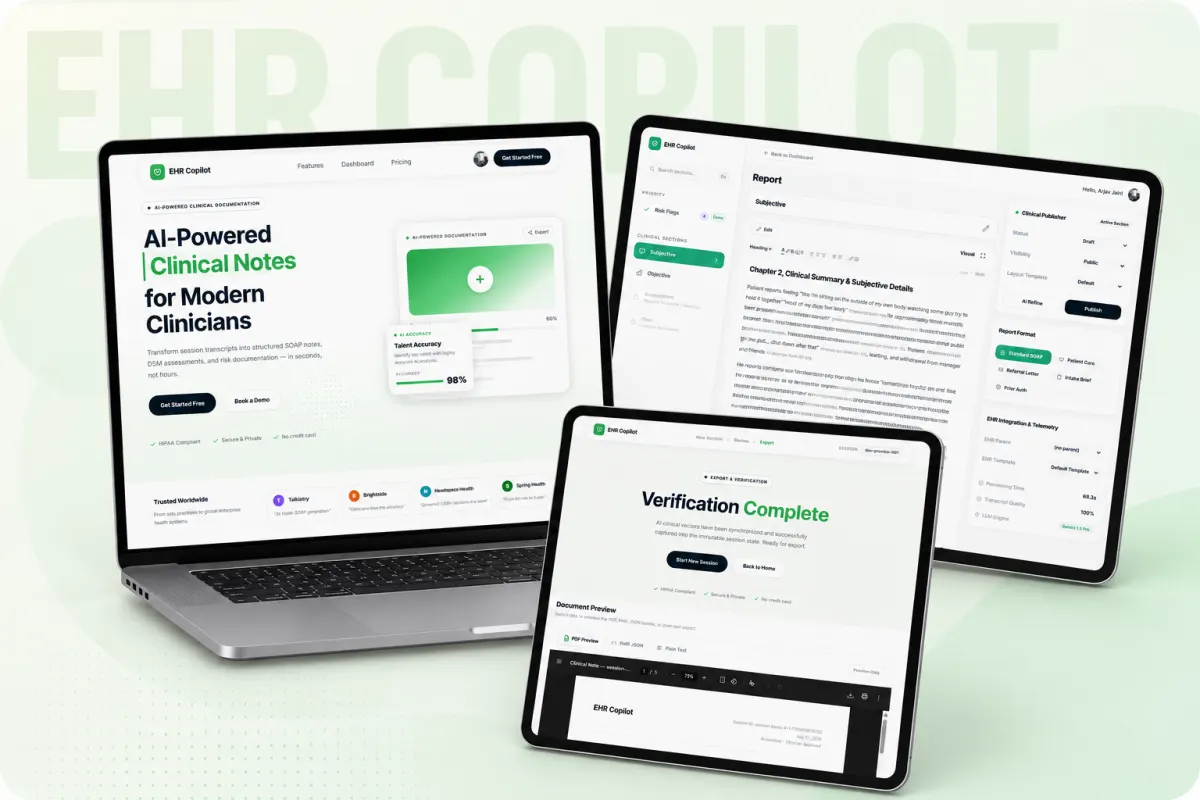
What EHR Copilot actually does
Its core function is documentation automation, not diagnosis or treatment advice. It generates notes in the SOAP format, which are used in clinical documentation.
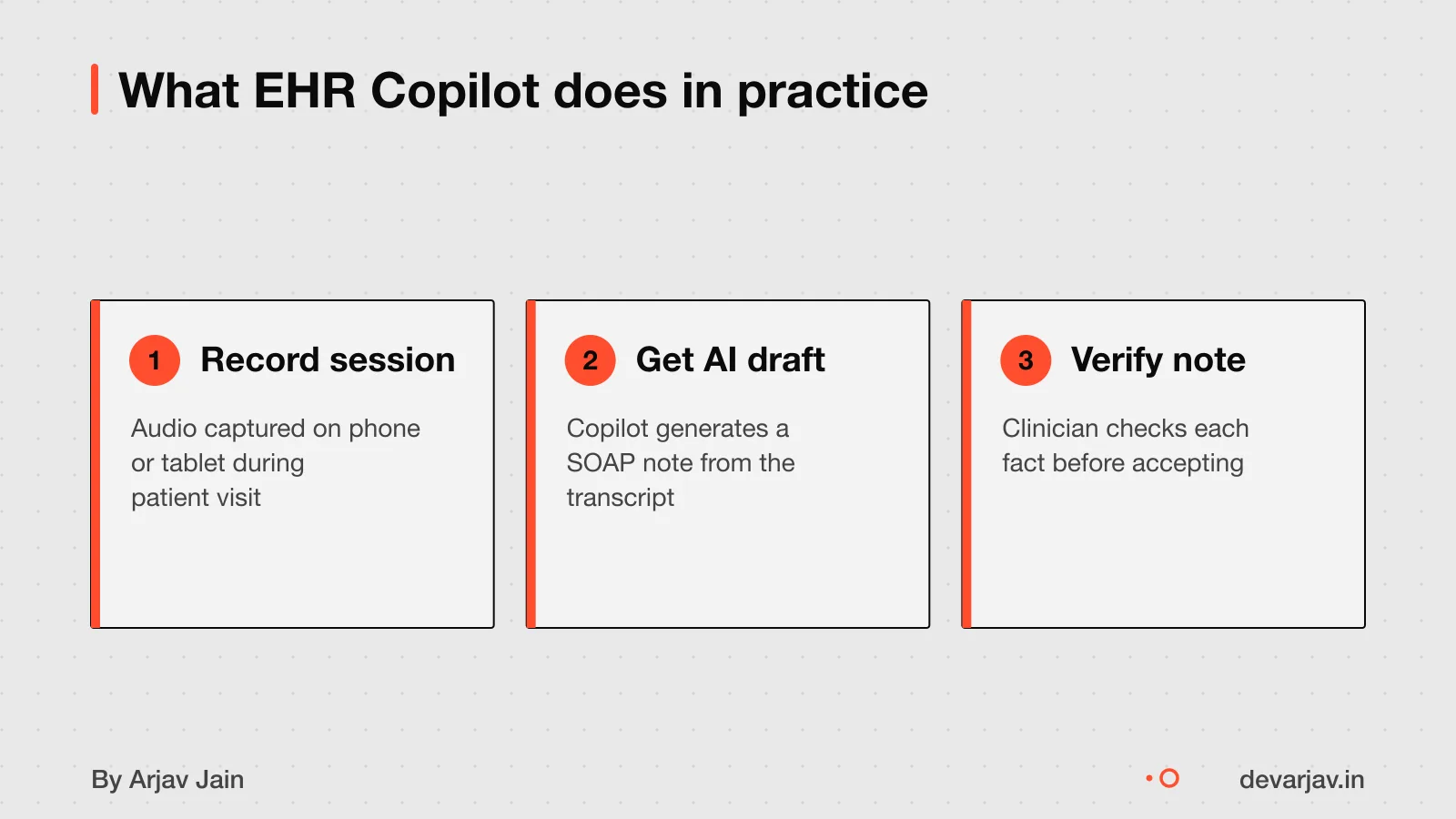
The tool fits into a clinician’s workflow by reducing time spent on note-writing after a session. You provide a transcript, and the AI drafts the note. You then review and edit it before signing off. This keeps you in control while cutting manual effort.
Unlike general AI tools, EHR Copilot focuses only on clinical documentation. It does not manage appointments or billing. How it integrates with existing clinic software like Epic is not known. You should check if your EHR allows third-party AI tools to send or receive data.
For another example of AI used carefully in a Flutter app. See how AI features in a Flutter app were built with privacy and review steps.
What is a SOAP note?
A SOAP note is a standard way to record a patient visit in four parts: Subjective, Objective, Assessment, and Plan.
The Subjective section includes the patient's story in their own words, such as their chief complaint. This captures the patient’s story.
The Objective section records measurable facts like temperature, blood pressure, or test results. The Objective section records measurable facts like physical exam findings, lab results, and other data.
The Assessment section synthesizes Subjective and Objective data into a clinical conclusion, often a diagnosis or differential diagnosis. It answers: What do these findings mean together?.
The Plan lists next steps: treatment, medicines, referrals, or follow-up visits. It must be clear and action-focused, like prescribing medication, setting follow-up goals, or arranging tests.
This format keeps notes clear, complete, and useful for any doctor who reads them later.
How clinicians review AI-generated notes
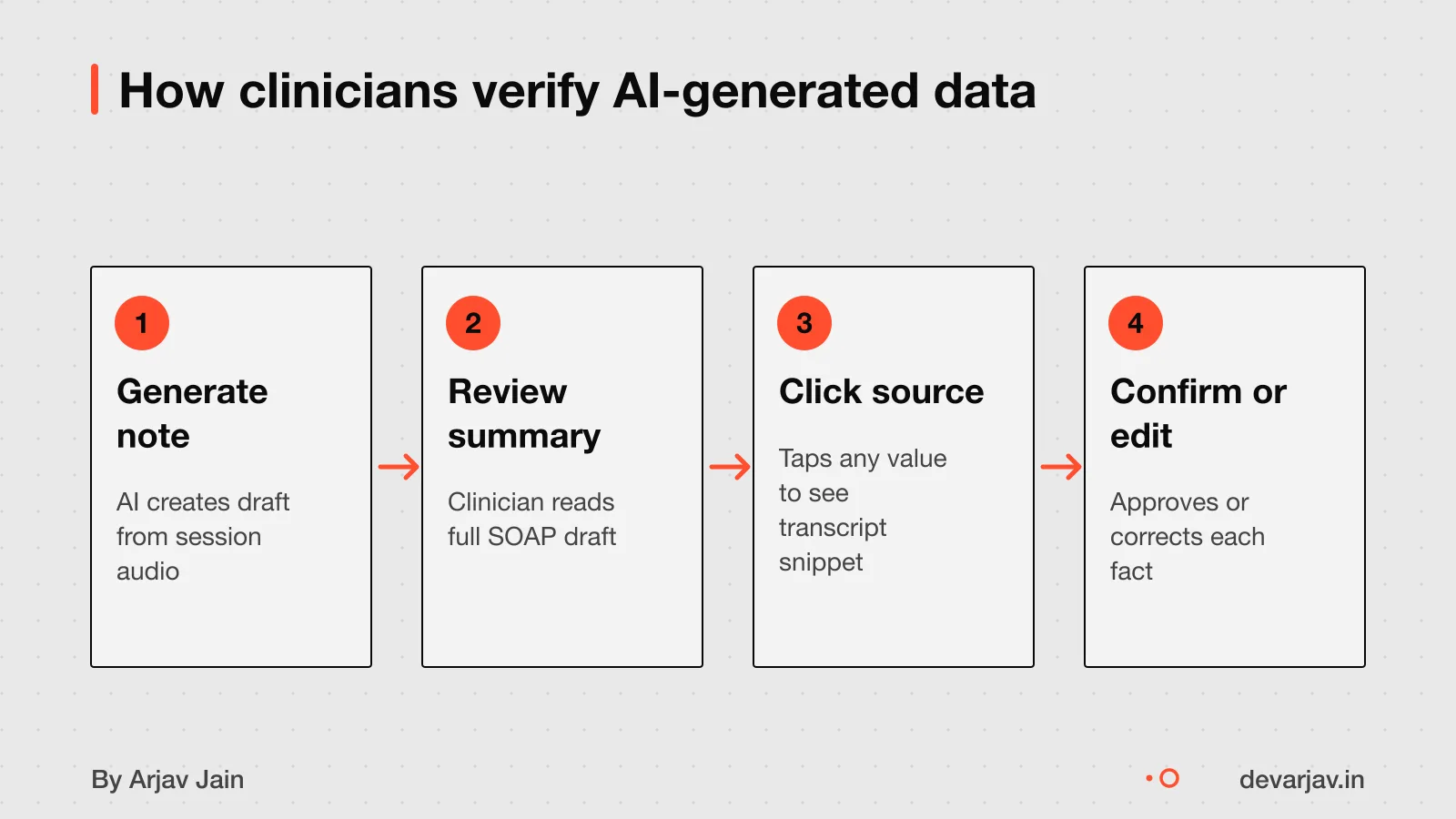
Unverified values are marked so nothing is accepted without review. This step ensures that only accurate, patient-specific details become part of the medical record.
To see where an AI-generated value came from, the clinician selects the assessment row in the system. This shows the ambient source, the exact part of the session transcript that the AI used. You can trace each point back to what was said, helping you decide if it is correct or needs change.
After reviewing all values and making edits, the clinician files the final note into the electronic health record (EHR). Once filed, it becomes an official clinical document. The review is not a formality, it is the safeguard that keeps AI-assisted notes reliable.
How Loopin handles data safely shows another project where data accuracy is built into every step.
Where data is stored and how long it is kept
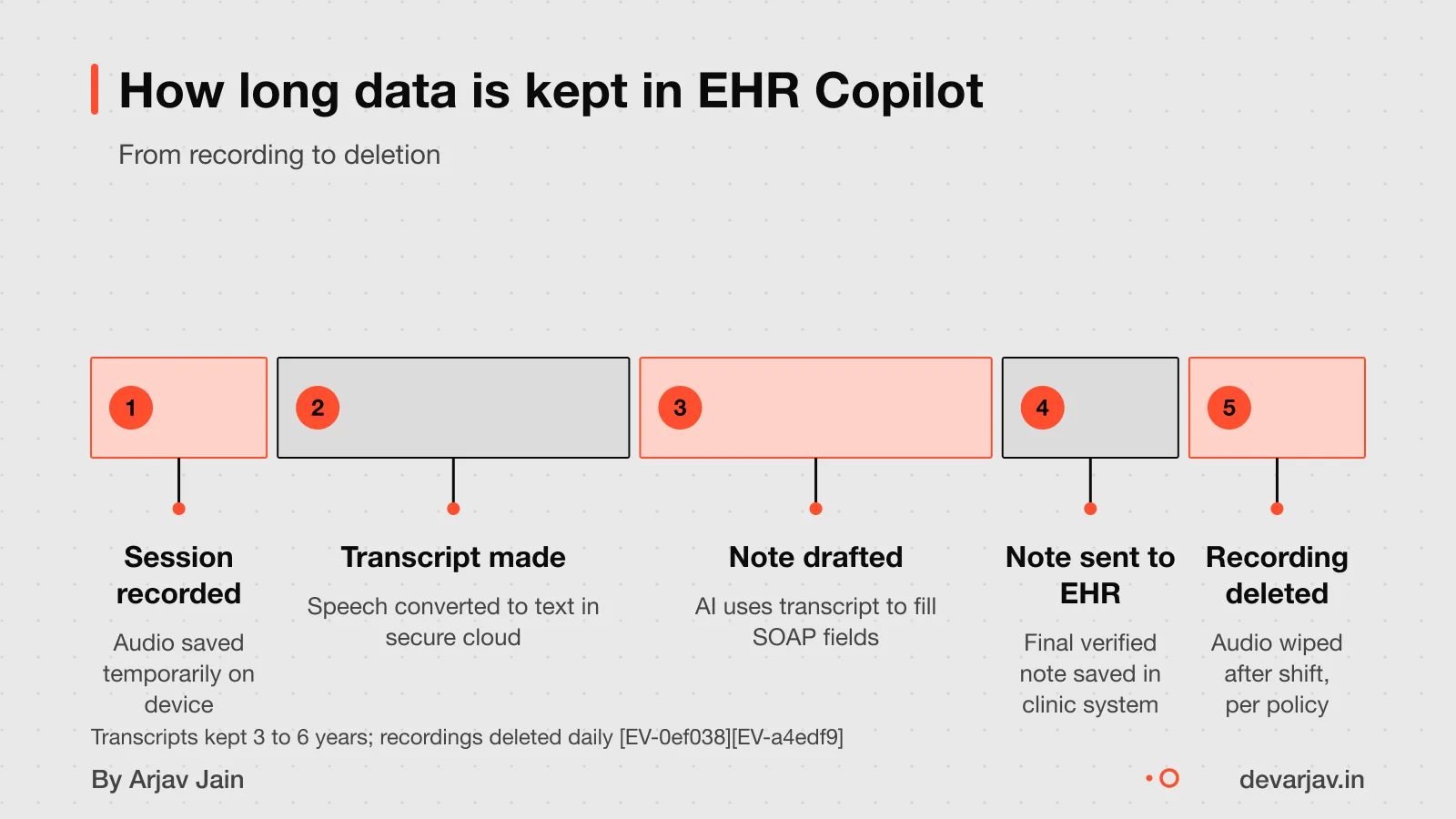
Recordings and transcripts are stored locally and remain visible only to you during the current shift. The transcript remains available for the current shift and is visible only to you.
Copilot-generated content, such as clinical notes, is saved in the same place as the host file. For example, in SharePoint or OneDrive if that is where your records are kept. These locations follow their own data retention policies.
Your prompts, responses, and patient data are not used to train Microsoft’s foundation AI models. Microsoft acts as a data processor under its Data Protection Addendum, meaning it handles data only as directed by the organisation.
Copilot Pages and Notebooks are stored in user-owned SharePoint Embedded containers. This gives you control over access and deletion.
Hire a developer for a clinic app to build custom data workflows that match your clinic’s needs.
Can you trust an AI to write clinical notes?
You are legally responsible for every AI-generated clinical note you sign. The law treats an AI draft like any other part of your practice: you must review it fully before signing. If you do not, you could face penalties under the False Claims Act for reckless disregard.
AI tools can mishear or misunderstand clinical details. For example, an AI might record "no chest pain" as "chest pain present" or add a symptom that was never mentioned. It may also leave out key observations the clinician made during the session.
Signing without review is a legal risk because it suggests you did not verify the care given. Even if the AI made the error, the clinician who signs is liable. Malpractice insurance does cover AI-assisted work, but only if the clinician exercised professional judgment.
Always treat AI-generated notes as drafts. Edit every section, confirm lab values and symptoms, and ensure the plan matches what you discussed. The safest use of AI is to save time on typing, not to replace clinical oversight.
Not sure if your AI tool has the right safeguards? Tell me your plan in two lines and I will say yes or no.
Message me on WhatsAppWho owns the data and the generated notes?
You own the AI-generated notes if your contract with the tool provider says so. Most AI companies grant you full rights to the output. But ownership does not mean copyright protection. In many countries, including the United States, you cannot copyright content made only by AI because copyright law requires a human author. This means others could copy the raw AI output without legal penalty.
Copyright applies only when you add your own creative work to the AI draft. The more you rewrite, restructure or add clinical insight, the more of the final note you can protect. For example, if you edit the AI’s assessment with your own diagnosis reasoning, that part becomes yours. But the unchanged parts may not be.
In India, there is no clear ruling on AI-generated content ownership. So your rights depend on two things: the tool’s terms of service and how much human input your team adds. Always check the contract before using any AI note tool. If in doubt, speak to a legal expert familiar with health data and intellectual property.
Setup, integration and what you need to provide
What inputs are needed to use EHR Copilot, whether it can integrate with existing clinic software. What setup or training is required are not specified in the available information. You would need to confirm these details directly with the vendor or developer before starting. Since the tool processes therapy session transcripts into clinical notes, it likely requires a clear audio transcript as input. But the exact format or method is not described. Integration with existing clinic management systems, such as electronic health record (EHR) software or appointment booking tools, is not confirmed. There is no public detail on setup steps, staff training, or technical support needs. As a clinic owner, you should ask the provider for a clear list of requirements, compatible systems, and the time needed to get started. Do not assume the tool works with your current software unless stated.
How much time might this save? A worked example
As an estimate, assuming a therapist creates 20 notes per day and saves 5 minutes per note, EHR Copilot could save 100 minutes daily. This assumes the AI draft is mostly accurate and the therapist only needs to make small edits. If the note needs major changes, the time saved drops or becomes negative. Review effort varies based on session complexity and patient condition. A well-structured session with clear outcomes will be faster to review than a complex or unclear one. The tool does not cut out review time, it shifts the work from writing to checking. You still need to read every line and confirm it matches what happened. For a clinic running back-to-back sessions, even 3 to 4 minutes saved per note adds up over a week. But if the AI misses key points, the review can take longer than writing from scratch.
When this tool is not the right choice
- Do not use an AI note-taking tool if you cannot review every note. Skipping review means you risk signing incorrect or incomplete records, and you remain legally responsible for them.
- This tool is not right if your team has no time to check each AI-generated note. The AI draft is only a starting point; unverified entries must not be filed as final.
- Do not use it without patient consent. If patients do not know their session is being recorded or transcribed, it breaks medical ethics and may violate privacy norms.
- Avoid this tool if your clinic cannot meet data compliance rules. You must confirm whether the system follows Indian data laws and whether you can export or delete data when needed.
What a clinic app really costs, compare this investment against other clinic tech needs.
The thinking
- 01
Problem
Clinicians spend hours on SOAP notes after each session, slowing down care and increasing burnout.
- 02
Decision
Generate a draft note from the session recording, but require the clinician to review and accept each section.
- 03
Why it holds
AI can misstate facts or miss key details. The clinician must stay in charge to avoid legal risk and ensure accuracy.
What it includes
- Session recording to structured note
- Draft generation with section tags
- Review interface with source tracing
Questions people ask
Is EHR Copilot a real product or just a demo?
Yes, EHR Copilot is a real tool that turns psychiatric session transcripts into structured SOAP notes. Dragon Copilot is a product used by clinicians for generating nurse notes. Thousands of clinicians are already using it.
How does EHR Copilot turn a transcript into a SOAP note?
The exact method is not known. The design focuses on letting clinicians review AI-generated notes, not on how the AI creates them. You must check every part before signing off.
Can EHR Copilot integrate with my clinic's existing software?
Integration is not confirmed. You should check with your EHR vendor and the developer building the tool. Some systems may allow data import, but direct sync is not promised.
How much time does EHR Copilot save per note?
As an estimate, assuming 5 minutes saved per note and 20 notes daily, you could save 100 minutes each day. This depends on how accurate the draft is and how much editing you need to do.
What training is needed to use EHR Copilot?
Training needs are not specified. Start with one willing clinician and follow the vendor’s onboarding steps. Hands-on practice with real sessions helps build confidence.
Can it be used in non-psychiatry clinics?
The design could work for other clinics, but the current example is for psychiatric notes. General use depends on whether the tool has been tested and approved for other specialties.
What questions should I ask a developer when building a similar tool?
Ask: What can this do without a human approving each step? When it is wrong, who catches it, and how? Show me the audit trail for one action on a real account. These help you assess safety and control.
Does EHR Copilot work without internet?
This is not confirmed. Assume it needs internet unless stated. If your clinic has poor connectivity, test the tool in your environment before relying on it.