What is a web app, and how is it different from a website?
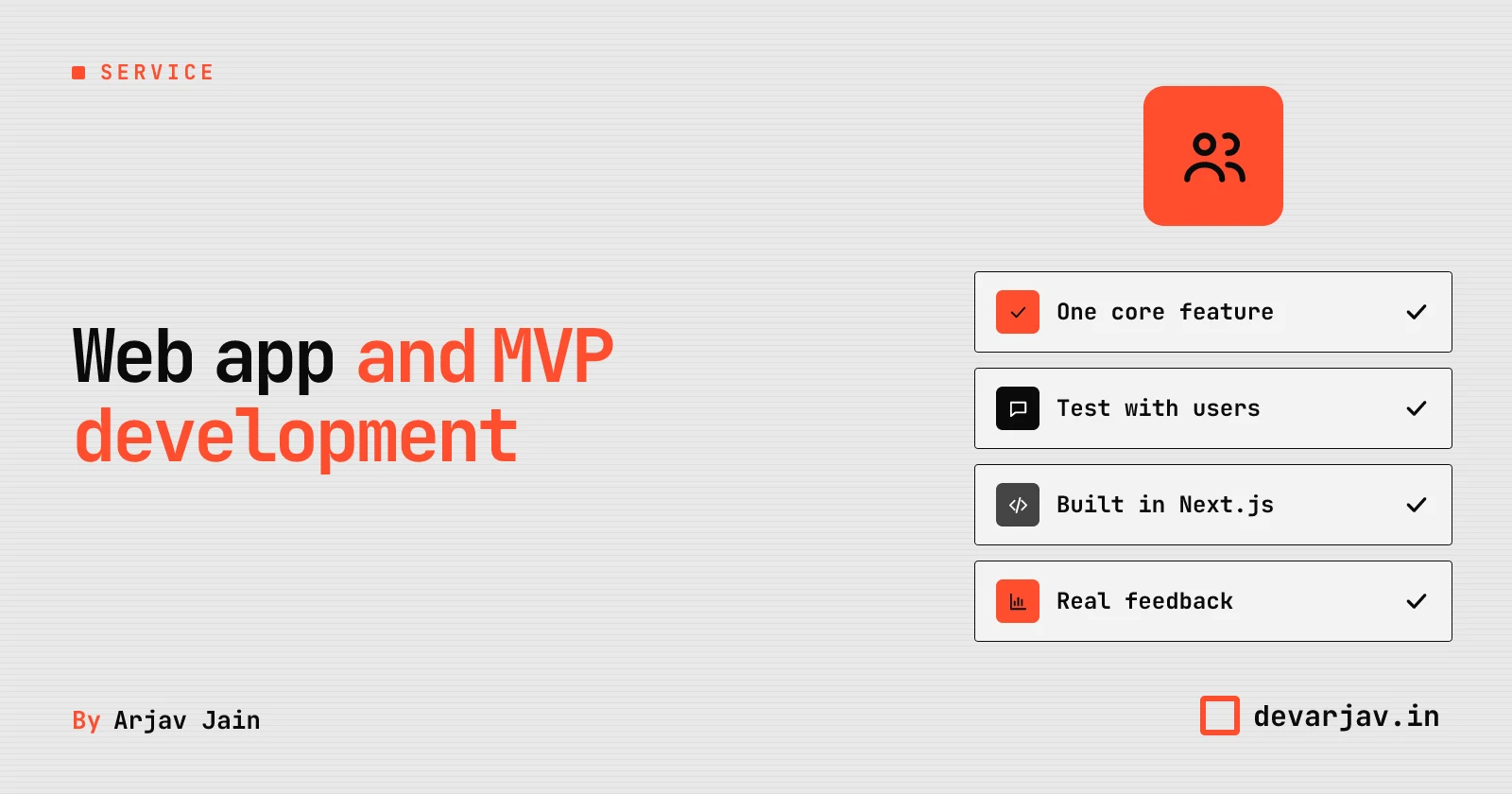
A web app lets users do tasks like save data, upload files or chat in real time. While a website only shows information like your shop's address or menu. You should choose a web app when your customers need to take action, not just read. For example, a bakery website can list cakes and prices. But a web app lets customers customise a cake, pick a delivery slot and pay online. A website works if you only want to share news or contact details. But if you want users to interact, like booking, tracking or managing orders, a web app is the right choice. It runs in a browser like a website, but behaves like a mobile app. Think of it as a tool, not a brochure.
If you are unsure whether you need a web app or a website, ask: "Should my customer *do* something here?" If yes, go for a web app. If not, a website is enough. You can always start with a website and add web app features later.
Learn more about mobile app development if you are comparing options.
What is an MVP, and how is it different from a full product?
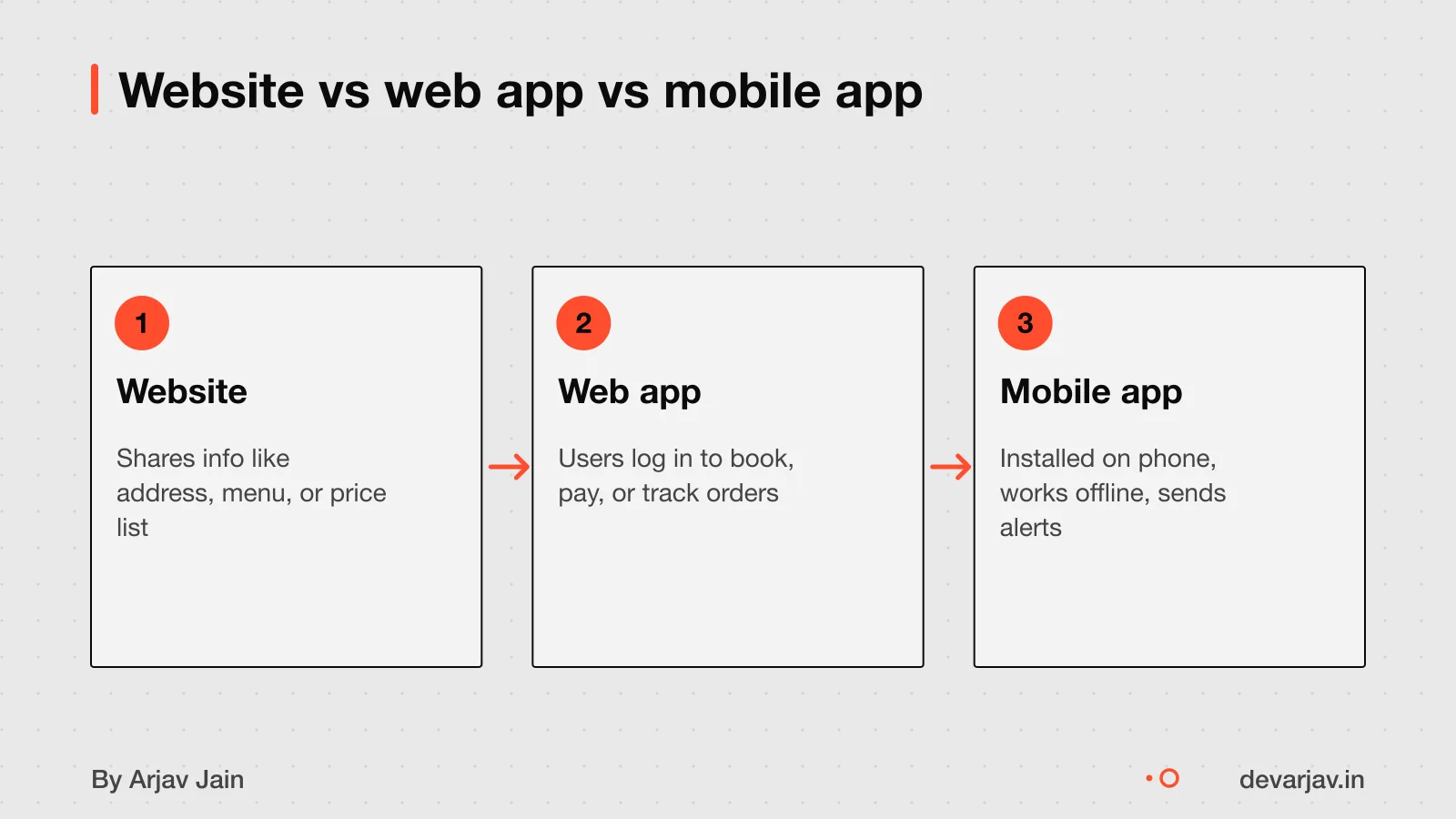
An MVP is not a half-built product. It is the simplest working version that solves one core problem for real users. Its goal is to test your business idea quickly and cheaply before building more.
A full product adds extra features, design polish, and scalability. An MVP skips those to save time and money. You use it to see if customers actually want what you offer.
For example, if you want to run a home-delivered meal service. A full product might let users browse menus, save favourites, track delivery, and pay online. An MVP would only let them place one type of order and pay, just enough to test demand.
This way, you avoid spending ₹10 lakh on a full app only to find no one orders. Instead, you spend ₹2 to 3 lakh on an MVP, learn fast, and decide whether to improve, pivot, or stop.
A working MVP answers the question: "Will people use this?" A full product answers: "Can we scale this?".
You should include only what proves your idea works. Everything else waits until you have proof. See what an MVP should include for cost details.
When do you actually need a web app?
You need a web app if your customers or employees must log in, manage data, or complete tasks that change information in real time. A website shares static content. A web app lets users interact with your business systems.
For example, if you want customers to create accounts, save orders, or track service status, you need a web app. If staff must update inventory, assign jobs, or view live sales, that is also a web app use case.
But do not build a custom web app if an affordable existing tool already solves 90% of your problem. Many small businesses start by using tools like Google Workspace, Zoho or KhataBook before building their own system.
If your work involves repeat tasks, user accounts, or live data, a web app can save time and reduce errors. If you only need to show prices, location or offers, a simple website is enough.
how to add phone login
How much does a web app or MVP cost in India?
This base cost covers a working product with one core function, built in Next.js, for early user testing. But most apps need more than the basics. Adding key features increases the cost. For example, a payment gateway adds ₹15,000. A WhatsApp integration can add ₹20,000 to ₹60,000. An AI / ML-powered MVP in India costs ₹8,00,000 to ₹18,00,000.
The total cost also depends on complexity. A basic tool for internal use may stay near ₹50,000. A customer-facing SaaS MVP for businesses can cost ₹6,00,000 to ₹12,00,000. If AI is central to your idea, expect ₹8,00,000 to ₹18,00,000. Even a simple app should include a 25% buffer for changes and fixes. This keeps your project on track without surprise bills.
Worked example: a local service booking app - Base MVP: ₹50,000 - Payment gateway (Razorpay): + ₹15,000 - WhatsApp reminders: + ₹10,000 - AI for smart slot suggestions: + ₹20,000 - Subtotal: ₹95,000 - 25% buffer (for scope changes): + ₹23,750 - **Total as an estimate**: ₹1,18,750
Assumptions: one core flow (booking), 5 to 8 screens, one database model, no admin panel beyond basic view. The buffer covers small changes during build.
For a broader view of costs, see app development cost in India.
Want a number for your idea? Send one line on WhatsApp. I reply with what drives the cost and what to cut.
Message me on WhatsApp
How long does it take to build a web app or MVP?
There is no known typical time to build a web app or MVP because public data or evidence does not provide a standard timeline [unknown]. Since no public data or evidence gives a standard timeline, do not assume any specific duration is typical [unknown]. Instead, ask each developer for their own estimate based on your idea.
Delays can come from unclear goals, changing features mid-way, or slow feedback from the client. For example, if you keep adding new screens after the plan is set, the project will take longer. Also, if the developer waits days for your reply on a design choice, progress stalls.
To avoid delays, agree on a clear scope before starting. Share your goals in one message and confirm what will be built. Then, respond to the developer within two days when they ask for input.
A simple MVP that does one thing well, like letting users book slots or track orders. Can be ready faster than a full app with many features. But without a fixed scope, even a small app can drag on.
Since timelines vary, focus on what you can control: your clarity, your decisions, and your replies.
What steps are involved in building a web app or MVP?
The steps to build a web app or MVP are not described in the evidence. As a small-business owner, you should ask your developer for a clear, written plan before starting. This plan should say what you must provide, how long each phase takes, and when you will review progress.
You must provide the goal of the app, the main task users will do, and any data or content it needs. For example, if it is a booking app, share your service list and availability rules. Without this, the developer cannot start.
You will need to review progress at key points, not daily. Most projects use weekly or biweekly check-ins to see working features. You should test the app yourself at these points and give feedback. A good developer will show real progress every two weeks, not just promises.
Since the process is not specified in evidence, do not assume all developers follow the same steps. Ask for a timeline with milestones and what you must do at each stage. This keeps the project on track and avoids delays.
Should I build with Next.js or another tool?
Next.js is a strong choice for your business web app because it works well for fast. Secure, and scalable apps that need real-time updates, user logins, or data dashboards. It runs on React, which many developers know, so support and tools are easy to find. This can speed up development and reduce long-term costs.
However, there are cheaper or faster options for simpler needs. If your app only shows content with no user accounts or live data. A static site with plain HTML or a tool like WordPress may cost less and take less time. For mobile-first apps, Flutter or React Native might offer faster results if your users will mostly use phones.
The best tool depends on your project goals and your developer's skill. A skilled developer using the right tool can deliver better results than a poor fit, even if the tech is popular. You should discuss your needs with your developer and review their past work in that stack.
Next.js is not the only option, and no single tool is best for every business. The key is matching the technology to what your app must do and who will maintain it.
React or Vue for a business web app
How do I check if a developer is good?
Look for live web apps in their portfolio, not just designs or videos. A good developer can show you a working product that real people use. Ask if you can try the app yourself or see a demo login. This tells you if the app actually works, not just looks good.
You can also ask to see a small part of the code, especially if it is open source. Check if the code is clean and well organised.
A developer should let you test the app early and often. This way, you see progress and catch problems early. You do not have to pay the full amount before testing.
If a developer only shows mockups or promises future features, be careful. You want someone who builds fast, listens to feedback, and shows real results.
Can I see real examples of Indian small business web apps?
Ask developers to share case studies from past clients, especially those in your sector, if available [unknown]. Look for live apps you can test yourself, not just videos or mockups. A real demo will let you log in, add data, and see how it behaves under small loads. If a developer cannot show a working product, consider it a risk. Some may share test versions with dummy data. Always check if the app solved the client’s problem and whether it still runs today. Since proof is not published, your best check is hands-on use.
What can go wrong, and how do I protect myself?
Building a web app carries risks if you start without clarity or safeguards. The biggest risk is spending money on software that does not solve your actual business problem. Also, do not proceed if you cannot clearly explain the problem the app must solve.
To pay safely, never pay the full amount upfront. Instead, agree on clear milestones and pay only when each is delivered and tested. Always set aside a budget buffer above the quoted price to cover unexpected changes, post-launch fixes, and early user feedback. Some experts recommend adding 20% to 25 to 30% to your budget for this. You may also need to reserve 20% of your total budget for the first three months after launch.
Before hiring a developer, ask to see live web apps they have built, not just designs or videos. Check if they use a clear tech stack like Next.js, which is open and easy to audit. Ask how they handle code ownership, data privacy, and post-launch support. Make sure all promises are in writing.
Have a quote in hand? Send it to me and I will mark what is missing.
Message me on WhatsAppWho owns the code, domain, and data?
You own the code only if your contract says so. By default, the developer keeps the initial copyright under Indian law, even if you paid for the work. This is true for freelancers and agencies alike. To own the code, your contract must include a clear clause that assigns all intellectual property rights to you.
If your project stops halfway, ownership depends on the agreement. Without a transfer clause, the developer can legally keep the code. You may lose access or pay more to finish it later. To protect yourself, sign a contract that states you own all code as it is written, even during development.
The domain name should be registered in your name or company. Never let the developer hold it. If they do, you risk losing your website address later. Ask for the login to the domain provider before work starts.
Data from your users belongs to you, as long as your app follows privacy rules. But make sure your developer does not store or reuse it. Delete clauses that let them use your data for other purposes.
Third-party tools like Google Maps need your own keys and accounts how to integrate third-party tools. Do not rely on the developer’s access. If they cancel it, your app breaks.
What legal or tax rules apply?
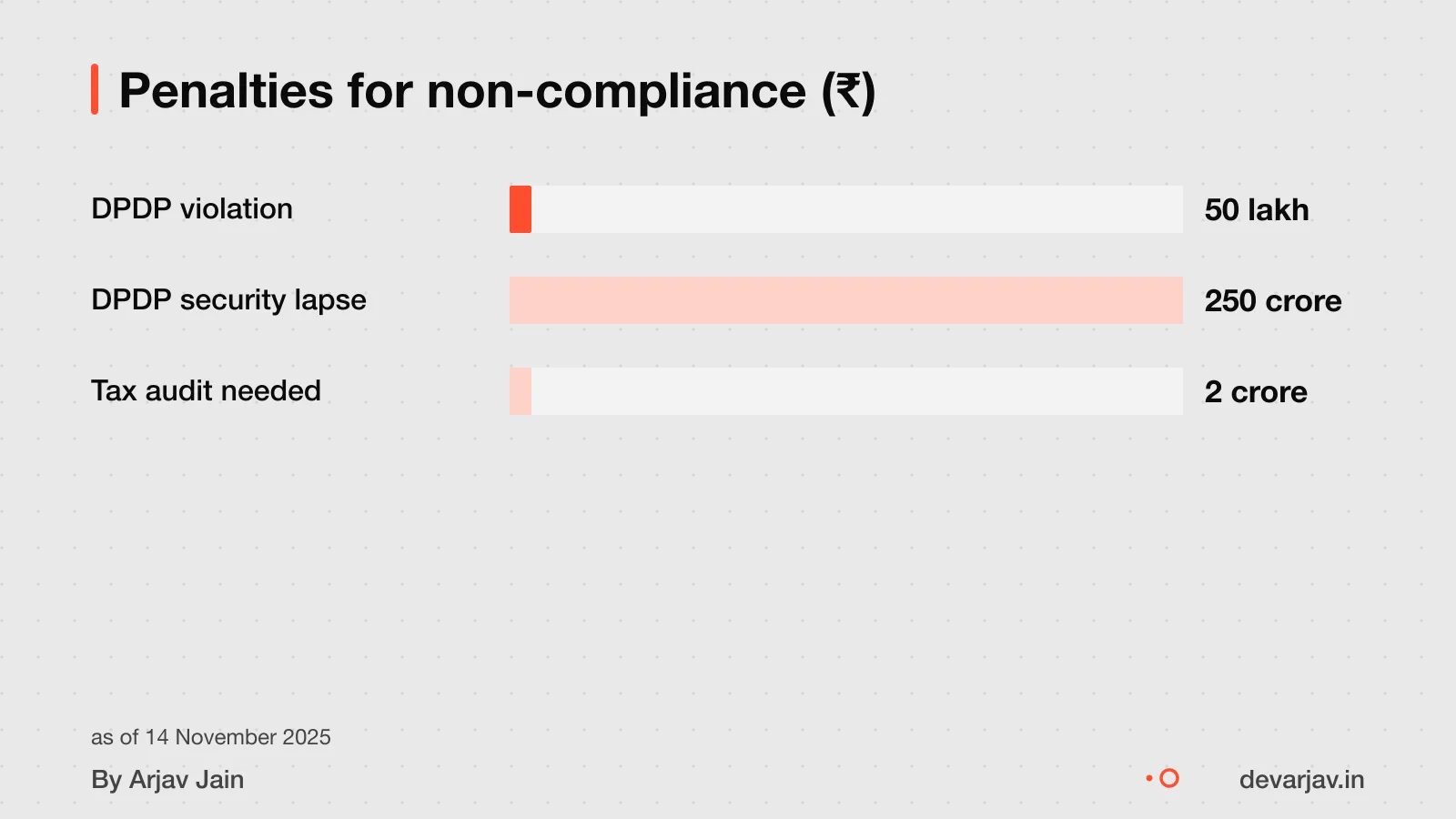
Yes, you must follow the Digital Personal Data Protection (DPDP) Act if your web app collects personal data from users. The law treats you as a Data Fiduciary, and failing to protect user data can lead to heavy fines. For example, not keeping security safeguards in place can result in a penalty of up to ₹250 crore. Even smaller violations can attract a fine of up to ₹50 crore. These rules apply the moment your app collects names, phone numbers, emails, or location data.
If your business has a gross turnover or receipts over ₹2 crore in a financial year and uses the presumptive taxation scheme under section 44AD. You must get a tax audit under section 44AB as per income tax rules. This rule applies whether or not your income is from the app.
Since laws depend on your business type, location, and data use. Talk to a chartered accountant (CA) for tax rules and a lawyer for DPDP compliance. They can help you draft privacy notices, manage consent, and file audits on time. Do not rely on your developer for legal advice.
What happens after the app launches?
You are responsible for bug fixes and updates unless your developer agrees to handle them. Most small businesses find that without a support plan, even small fixes take days or weeks to arrange, and urgent bugs can hurt trust. It is best to agree on who will maintain the app before launch.
Maintenance costs are not known from public data or evidence. As an estimate, assuming monthly updates, security patches, and minor fixes. Ongoing support might cost 15 to 20 per cent of the initial build cost per year. For a ₹50,000 app, that is ₹7,500 to ₹10,000 annually.
You should plan for hosting renewals, domain fees, and updates to libraries or frameworks. These keep your app secure and working on new devices. Without regular care, your app may slow down or stop working.
Some developers offer yearly maintenance packages. Ask for a written scope: what is included, response time for bugs, and how updates are tested. Avoid vague promises like "full support" without a checklist.
If you switch developers later, make sure your code and documentation are complete. Poorly documented code can double the cost of future changes.
When should I not build a web app or MVP?
- You should not build a web app if your business problem is not clear. If you cannot explain in one sentence what the app will fix, pause and talk to your customers first.
- A custom web app is overkill if an existing tool already solves most of your problem. For example, if you only need to take bookings and payments. A ₹5,000 per month SaaS tool may be faster and cheaper than a ₹5 lakh custom build.
- Do not build an MVP if you are not ready to test it with real users. An MVP only works when you can collect feedback, learn, and change direction. If you just want a polished product to launch, that is not an MVP.
- Avoid a web app if your team cannot support it after launch. You will need someone to fix bugs, update features, and handle user issues. If you expect “set it and forget it,” stick to a simple website or third-party service.
How do I start building a web app or MVP?
The first step is to document your business problem clearly. Write down what happens now, who is involved, where things go wrong, and what you want the app to fix. This helps you and the developer stay focused on what matters.
Once you have this, you can start talking to a developer. I work directly with small-business owners like you, no agency, no middlemen.
Next step: message me on WhatsApp with what you want to build. No forms, no sales team.
Message me on WhatsAppAssumptions behind the numbers
- Base cost assumes a simple web app in Next.js with login and forms.
- Each integration (payment, WhatsApp, AI) is added once.
- A 20% buffer is applied to the total for scope changes.
What is in it, and what is not
A web app or MVP built in Next.js, with clear milestones and ownership of code. You pay for what is scoped, not hours spent.
- 01Written scope
Features, screens and integrations listed plainly, with version two items marked.
- 02Design preview
Core screens and flow shown before coding begins, so changes happen on paper.
- 03Web app in Next.js
Built to run in browsers, with login, forms and dynamic data if needed.
- 04Testable milestones
Working versions shared at set points, not just a final demo.
- 05Code and data in your name
Repository, domain and hosting accounts are set up under your business.
How it runs: milestones you can test
- 1Scope signed off
You can test: Agreed list of features, screens and integrations, with future items noted.
- 2Core flow working
You can test: Main user path testable with placeholder content in your browser.
- 3All features built
You can test: Every item in scope present and reacting correctly.
- 4Live and handed over
You can test: App deployed, domain linked, accounts and code transferred to you.
Right for you if
- You need users to log in, manage data or test a business idea.
- You want a clear scope before work starts.
- You prefer to pay for features, not time spent.
Look elsewhere if
- You want a complex AI model trained from scratch.
- You need deep native integrations or game-like performance.
- You gave no details and expect a fixed quote.
How it is priced
Price depends on scope, not time. You get a written list of features first, then a breakdown by milestone. Add-ons like payment or WhatsApp raise the cost. A 20% buffer is added to cover small changes.
Questions to ask before you sign, with anyone
- What exactly is in version one?
- Which APIs or tools are used?
- Can I test each part as it is built?
- Who owns the code and data after?
- What if I want to pause or change course?
Quick answers
Is ₹50,000 the final price?
No. That is for a basic app. Payment gateways, WhatsApp or AI tools add ₹15,000 to ₹1,00,000 each.
Do I own the code?
Yes. The repository and accounts are in your name from day one.
What is Next.js?
A tool to build fast, modern web apps. It handles login, forms and databases well.
Why not build a website?
If users need to log in or manage data, you are building a web app, not a website.
Can I add features later?
Yes. New scope is priced and added as a separate agreement.
What is an MVP?
The simplest version that tests your idea with real users.
Are there hidden costs?
We add a 20% buffer for small changes. Hosting and third-party tools are extra.
Questions people ask
What should I check before hiring for web app and MVP development?
Ask about the tech stack, timeline, code ownership, support after launch, and payment terms. Make sure they document your business problem first. A clear contract should cover these points to avoid delays or disputes.
How should I pay for my web app or MVP?
Pay in milestones, with 20% of the total budget held back for post-launch fixes. Add a 20% buffer to your accepted quote to cover unexpected changes.
Whose code is it if we stop halfway?
The developer usually owns the code unless your contract says otherwise. Even if you paid, you do not automatically get ownership. Always sign a contract that transfers full rights to you.
What if I already have a website?
A web app can add user logins, workflows and data tracking to your current website. For example, turn a static menu site into an ordering system with customer accounts.
Do I need a mobile app too?
A web app works on phones, but a mobile app is better. If users will open it often or need device features like GPS or offline access. Consider a mobile app only after testing demand with a web version.
Can I add AI to my MVP?
Yes, but expect to pay extra. Adding OpenAI or Claude API costs ₹30,000 to ₹1,00,000. Start with a simple AI feature to test user response before building more.
How long does an MVP take to build?
The typical time to build an MVP is not known from public data. Since timelines vary by scope and team, ask your developer for a written plan with clear milestones and delivery dates.
What are real examples of web apps for Indian small businesses?
Real examples are not listed in the evidence. Ask developers to share case studies of past work, especially for businesses like yours. Test live demos to see how they work in practice.