What are Next.js and WordPress?
Next.js is a React framework for building full-stack web applications. It lets developers create custom features like user logins, forms and dynamic content. It has two routers: App Router and Pages Router. App Router uses React canary releases with stable React 19 changes.
WordPress is a content management system (CMS) that powers over 43% of websites on the internet as of 2025. It works well for informational sites, blogs, portfolios, e-commerce and mid-complexity apps. Out of the box, a WordPress site includes mobile-responsive design, a CMS for easy updates. Contact forms, WhatsApp chat, Google Maps, a blog and basic SEO setup.
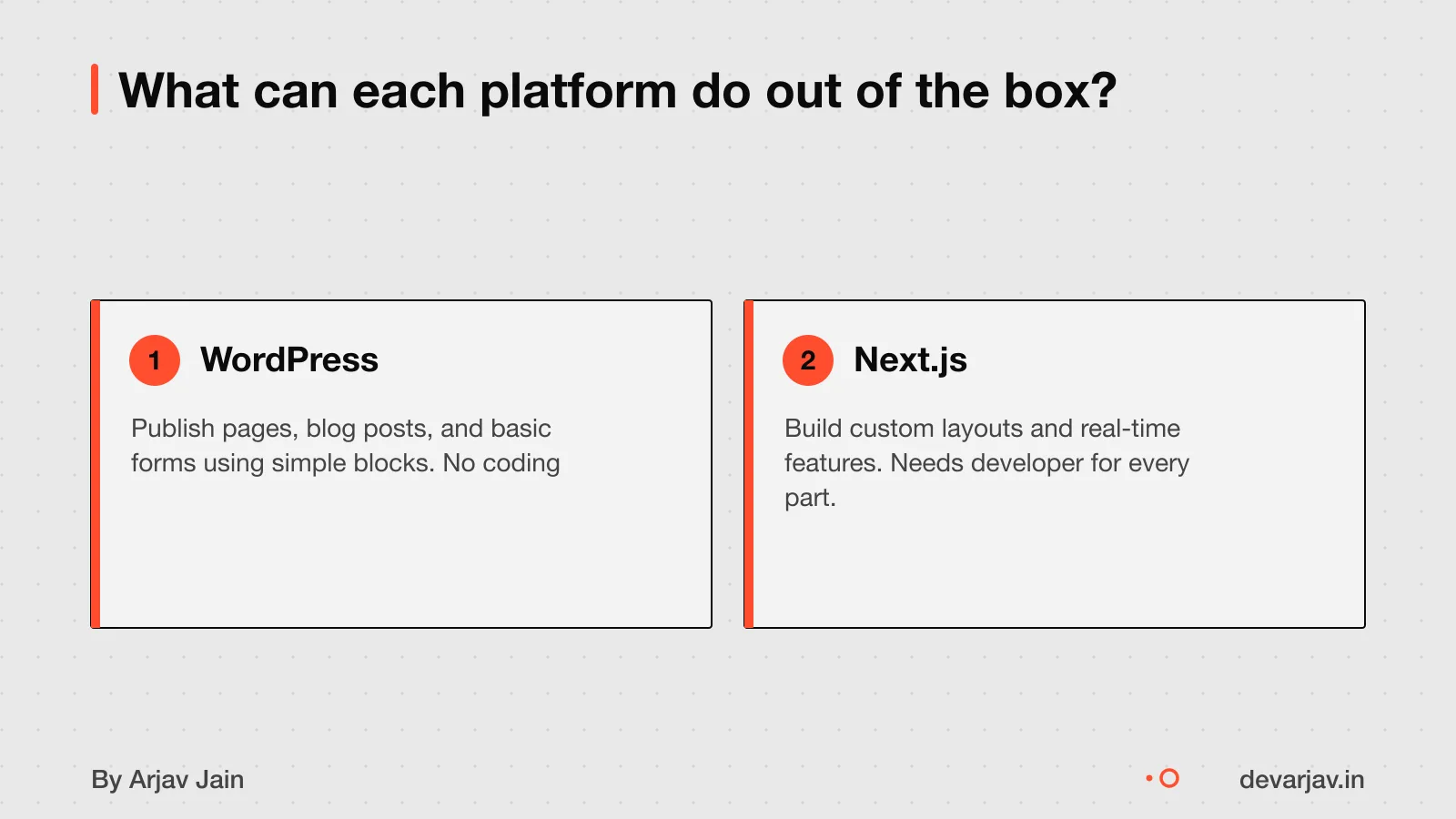
Small businesses, clinics and local services often use WordPress because it is easy to set up and manage. Next.js is used by developers who need full control over custom features and performance. Such as in web apps with real-time data or complex user flows.
Do you need a custom site or will a template work?
For most small businesses, a template-based site is enough and keeps costs low. You can use a template if your needs are simple, like showing your address, phone, services, photos, and a contact form. This works for shops, clinics, schools, and local services that do not sell online or need complex tools.
You need custom code if you want unique features, such as booking forms, member logins, or tools that link to your stock or staff system. Custom work also lets you change how the site looks beyond what templates allow. A custom WordPress site can cost ₹1,00,000 to ₹3,50,000.
Using a template cuts both time and cost. A ready-made design with small changes can go live in days and cost as little as ₹8,000. Custom code takes longer and costs more, but gives you full control. If your business grows, you can add custom parts later.
custom app or a readymade app
WordPress vs Next.js: cost, time and maintenance
A WordPress site costs less and takes less time to build than a Next.js site. For most small businesses, this makes WordPress the better choice unless you need custom features.
Build cost and time
A basic WordPress business site costs ₹25,000 to ₹1,00,000 and takes 1 to 2 weeks to build. Agencies may charge up to ₹3,00,000 depending on scope. A standard site with more pages takes 2 to 4 weeks.
A Next.js landing page costs $500 to $3,000 (about ₹42,000 to ₹2.5 lakh at ₹84/$) and takes 1 to 2 weeks. A full e-commerce site can cost $5,000 to $25,000 (₹4.2 lakh to ₹21 lakh).
| Feature | WordPress | Next.js |
|---|---|---|
| Typical build cost | ₹25,000 to ₹1,00,000 | $500 to $25,000 |
| Build time (basic site) | 1 to 2 weeks | 1 to 2 weeks |
| Build time (standard site) | 2 to 4 weeks | Not known |
| Best for | Most small businesses | Custom or high-performance needs |
Yearly maintenance cost
WordPress maintenance costs ₹2,500 to ₹10,000 per month (₹30,000 to ₹1.2 lakh per year). This includes updates, backups, and security checks.
This covers developer time for updates, hosting, and bug fixes.
| Cost type | WordPress (monthly) | Next.js (monthly) |
|---|---|---|
| Maintenance | ₹2,500 to ₹10,000 | ₹10,000 to ₹30,000 |
| Maintenance (yearly) | Not stated | Not stated |
| Hosting included? | Usually included | Usually included |
| Developer help needed | Low (for basic updates) | High (for all changes) |
As an estimate, assuming a basic site with no e-commerce, WordPress is cheaper and faster to set up and maintain. Next.js becomes cost-effective only if you need custom features or high speed.
Want a number for your business website? Send one line on WhatsApp. I reply with what drives the cost and what to cut.
Message me on WhatsApp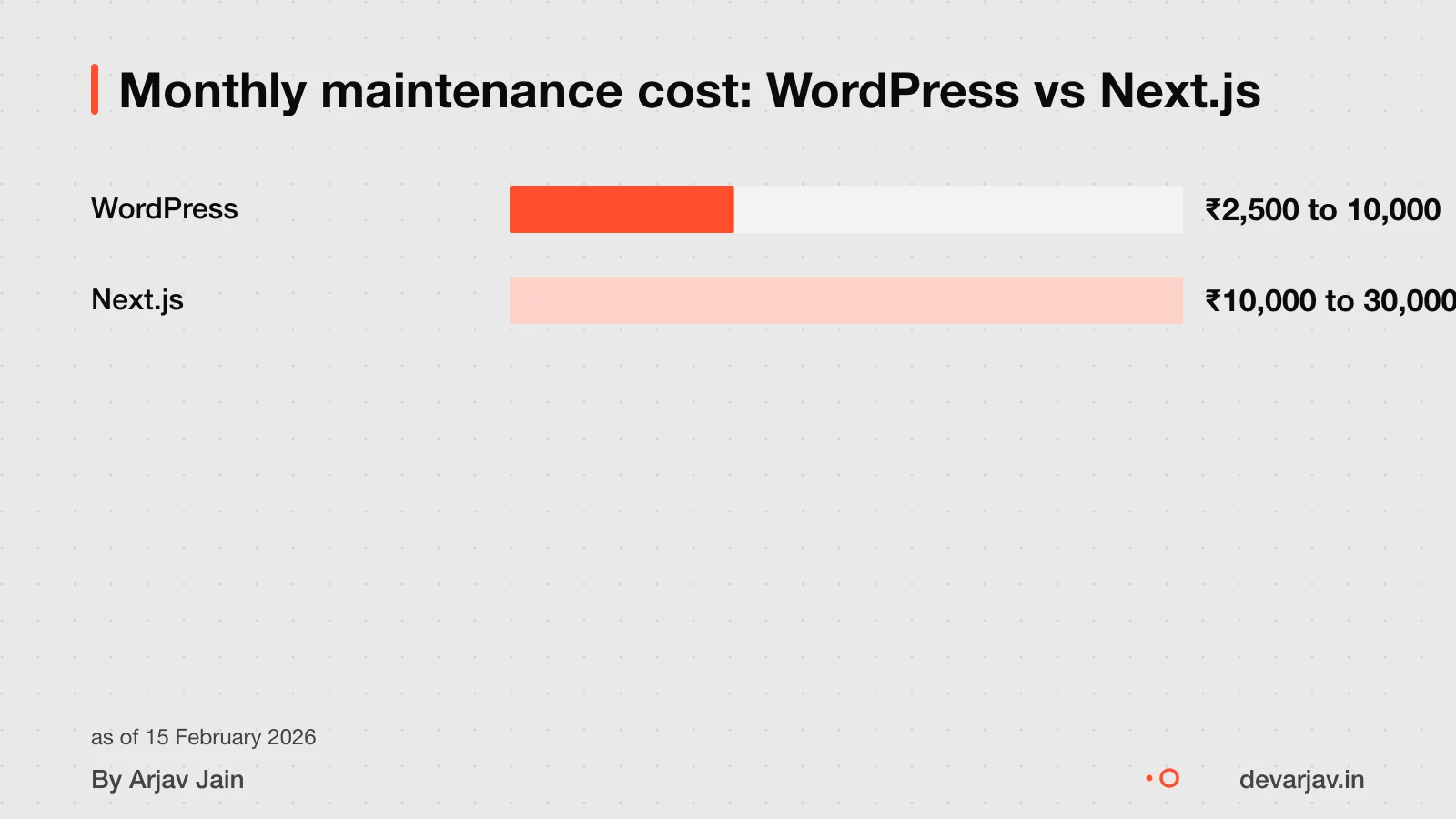
Who will update the site after launch?
WordPress is a good option if your content team wants to update the site without needing to contact a developer. Many small businesses in India use it this way for clinics, shops and schools.
You cannot update a Next.js site yourself unless you are a developer. Next.js code is written in React and JavaScript, so every change needs coding skills. If you want to change a price, add a service, or fix a typo, you must ask a developer.
So WordPress needs a developer only at launch, while Next.js needs one for every update. Some Next.js sites use a headless CMS to fix this, but that adds cost and complexity. For most small businesses, that is not worth it.
As of 2026, WordPress.com offers an AI website builder. This can help if you are short on time or staff. But the AI tools are optional and not needed for basic updates.
Which one is faster and more modern?
Next.js can offer better SEO performance because it supports server-side rendering and static site generation. This means your pages show up quickly for visitors and search engines.
How a site looks depends on the design, not the platform. But Next.js is better for custom web apps with performance needs or growth into a product. WordPress can look modern too, especially with premium themes, but it is limited by the template structure.
If you plan to grow your site into a web product with user accounts, forms or real-time updates, Next.js is better suited. Speed alone does not decide the best platform for your needs.
What can go wrong with WordPress?
A WordPress site can experience the White Screen of Death, which is a blank screen with no information. This often happens due to plugin conflicts, theme incompatibility, or corrupted files. The result may be a blank white screen with no error message, known as the White Screen of Death (WSOD). To fix it, you may need to disable plugins or restore files.
You should scan your WordPress site with Sucuri SiteCheck to check for hacking. Common signs include slow performance, pop-ups, or search engine warnings. You can check if your site is compromised by scanning it with Sucuri SiteCheck, a free online tool.
If a plugin stops working, your site may lose that feature or break completely. This can happen if the plugin is no longer updated or conflicts with a new update. Always back up your site before updating, and use only trusted, actively maintained plugins.
What can go wrong with Next.js?
If your Next.js developer leaves, you may struggle to find a replacement who understands the custom code. Next.js sites are built from scratch, so each one is unique. Without clear documentation, a new developer must spend time learning the structure before making changes. This can delay updates or fixes. Some owners hire the original developer for ongoing support, but that adds cost. Others keep the source code and hope to find a skilled local developer. As of now, I do not have verified cases from Indian small businesses to show how often this happens or how much it costs. You should ask your developer how they document the work and what support they offer after launch. A clear handover plan reduces risk. [[cta]] Not sure if your project has this risk? Tell me the plan in two lines and I will say yes or no.
Who owns your website and code?
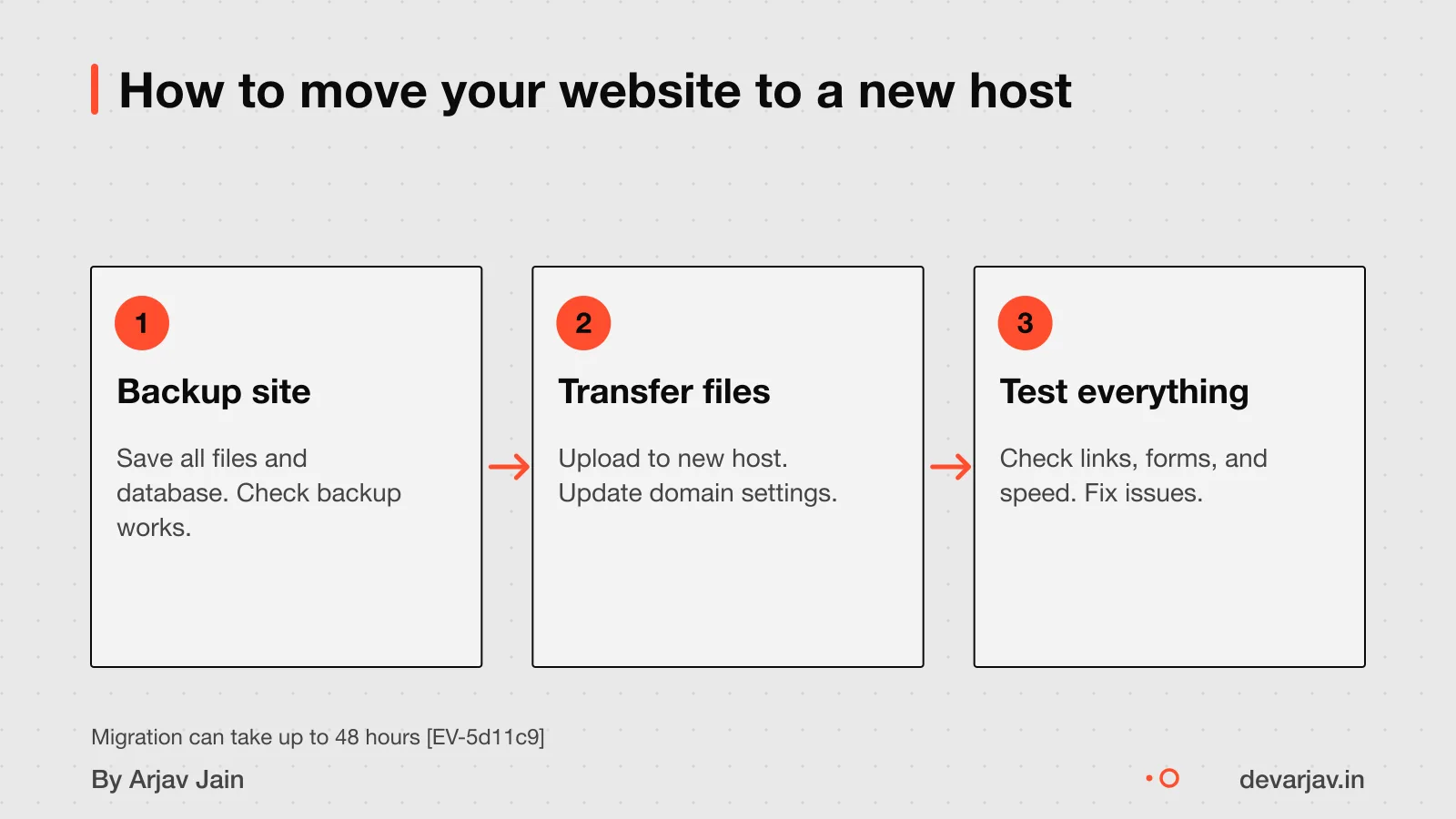
Yes, you should own your domain. If the registrar account is yours, you can always repoint the site. If your domain registrar account is under your control, you can always redirect the website even if you change developers or hosts. You can move a WordPress site to another host easily because you get full access to files and databases. With Next.js, moving is possible if you have access to the domain registrar, DNS, and Git host or hosting team. If your developer built the site in their personal Vercel account, they must transfer it to a team account you control. To take over any Next.js project, prove ownership of the domain, DNS, and Git or hosting accounts. Always ask for access to these accounts at launch.
Is WordPress good enough for a small business in 2026?
Yes, WordPress is good enough for most small business websites in 2026. It can handle high traffic, rank well on Google, and is not outdated.
WordPress can handle high traffic if it is on well-configured hosting. For example, news sites and large blogs with millions of visitors use WordPress with the right setup. Your local shop or service site will not face traffic levels that break it.
It can rank on Google because it supports clean URLs, fast loading, and SEO plugins like Yoast. These help you add keywords, meta descriptions, and structured data. Google does not prefer one platform over another, it ranks pages based on content, speed and user experience.
WordPress is not outdated. It powers over 40% of all websites and gets regular updates. New tools like full-site editing and block themes keep it modern. It is not just for blogs, it works for business sites, portfolios and online stores.
When is Next.js worth the extra cost?
You might consider Next.js if you need features not available in WordPress plugins. This is because Next.js allows complete control over the frontend, among other benefits.
For example, if you run a clinic and want patients to book appointments with live availability, upload documents securely. Get automated reminders, all in one place, WordPress plugins may not do it well. With Next.js, a developer can build a system that supports custom UX and growth into a product.
Similarly, if you plan to scale beyond a website, say, into a mobile app or a member-only portal. Next.js makes it easier to reuse code and maintain performance. This is not just a site, but the start of a digital product.
But if you only need a brochure site with services, contact details, and maybe a blog, Next.js is too much. You will pay more and wait longer for no real gain.
app or website first what is an API
How to start with WordPress
Tell your developer you want a simple, template-based site using WordPress. This keeps cost and time low. Ask for a theme that matches your business type, like a clinic, shop or service.
Prepare your logo, business name, address, phone number, email, and a short description of your services. Gather photos of your shop, team, or work. Write down common questions customers ask.
Ask three developers for quotes. Check if hosting, domain, and GST are included. Ask how long updates take, and if you can edit text or add a blog yourself. Ask if they use page builders like Elementor, as these can slow your site later.
Ask whether the theme and plugins are updated regularly. Find out who handles security and backups. Ask for a content management training session so you or your staff can update the site.
How to start with Next.js
Tell your developer you want a custom site using Next.js with clear goals like user logins, forms, or real-time updates. Share your business needs early. For example, booking forms, product listings, or member areas. This helps them plan the code and database.
You do not need to know technical details. Your developer should use Next.js with React. This helps future developers understand it.
For help, go to the official Next.js documentation. It has a Getting Started guide, step-by-step tutorials, and full API references. If you have questions, you can ask the community on GitHub Discussions, Discord, X (Twitter), or Reddit. These are free and active spaces. Developers help each other there.
If you are in Raipur and need a skilled developer, read our guide on how to choose a Next.js developer in Raipur. It covers what to ask and what to check before hiring.
When this advice is wrong
- Do not use WordPress if you need custom data views. For example, if you run a clinic and want to see patient appointments grouped by doctor and day. Or a school that needs live attendance reports by class, WordPress may not support this without heavy custom work. In such cases, Next.js allows full custom logic and is the better fit.
- Do not use Next.js if you cannot afford ₹1.1 lakh or wait 8+ weeks. A custom Next.js site takes longer and costs more than a WordPress site. If you need a working website fast and on a tight budget, say, under ₹75,000. Within 4 weeks, WordPress with a good theme and plugins will serve you better.
- This advice may not apply if you are in a tier-3 town with limited developer access. If local developers only know WordPress, starting with it makes sense even if Next.js fits your needs. You can always rebuild later. Local support and ease of updates matter more when expert help is hard to find.
Next step: message me on WhatsApp with what you want to build. No forms, no sales team.
Message me on WhatsAppAssumptions behind the numbers
- Conversion rate: $1 = ₹74
- Standard site scope for WordPress
- Landing page scope for Next.js unless e-commerce is selected
Pick your situation
I build both WordPress and Next.js sites, so I benefit from either choice. My advice is based on cost, time and fit for small businesses.
Pick your situation
WordPress wins. A standard WordPress site works well for local visibility, contact forms and basic pages. It is fast and low-cost.
The whole comparison
| WordPress | Next.js | |
|---|---|---|
| Cost to build | ₹25,000 to ₹1,00,000 | $1,500 to $25,000 (₹1.1 lakh to ₹18.5 lakh) |
| Time to build | 2 to 4 weeks | 1 to 12 weeks |
| Monthly maintenance | ₹2,500 to ₹10,000 | ₹10,000 to ₹30,000 |
| Best for | Clinics, shops, tuition centres | Custom tools, dashboards, apps |
| Updates | Anyone can edit pages | Needs a developer |
| Performance | Good with caching plugins | Built-in speed and SEO tools |
Whichever you choose, ask these
- Can I switch later from WordPress to Next.js?
- Do I own the code and domain?
- What support is free and what costs extra?
- Will my site work on phones?
Questions people ask
Which one is cheaper: Next.js or WordPress?
WordPress is cheaper for most small sites. A WordPress business website costs ₹25,000 to ₹1,00,000, while a Next.js landing page costs $500 to $3,000 (about ₹40,000 to ₹2.4 lakh). WordPress uses templates and plugins, so it takes less custom work.
Can a WordPress site be as fast as a Next.js site?
Yes, a well-hosted WordPress site with caching can be fast. But Next.js can offer better SEO performance because it supports server-side rendering and static generation. Good hosting and setup matter for WordPress speed.
Is Next.js better than WordPress for SEO?
Next.js supports better SEO controls like fine-tuned page speed and Core Web Vitals. But WordPress can still rank well on Google using SEO plugins. Both can work, but Next.js gives more control over technical SEO.
Can I switch from WordPress to Next.js later?
Yes, you can use WordPress as a headless CMS with Next.js for the frontend. But this adds cost and complexity, as you need a developer to set it up and maintain both systems.
Do I need a developer for every change in Next.js?
Yes, most changes in Next.js need a developer. Unlike WordPress, where you can edit pages and posts yourself, Next.js treats content as code. This makes updates slower and more costly without technical help.
What legal rules apply to my website, like GST or privacy?
Both platforms can support GST invoices and privacy notices, but you must set them up correctly. This website is not linked to any government body. Check this for your case with a chartered accountant or lawyer.
How do I check if a developer is good at WordPress or Next.js?
For WordPress, ask if they have done custom work beyond themes and plugins. For Next.js, check if they can explain React components and state management. Avoid those who only use ready-made templates.
Can WordPress handle 10,000 visitors a day?
Yes, WordPress can handle 10,000 visitors a day if hosted well. It has scaled to millions of monthly visitors on proper infrastructure. But your actual performance depends on hosting, plugins, and content size.
Is React.js/Next.js more expensive than WordPress?
Yes, React.js and Next.js are more expensive than WordPress. A Next.js e-commerce site costs $5,000 to $25,000, while a WordPress business site costs ₹25,000 to ₹1,00,000. Custom code takes more time and skill.
Is Next.js overkill for a small business website?
It depends on your needs. If you only need a simple site with pages, contact forms, and blogs, WordPress is enough. Next.js makes sense only if you need custom features not available in plugins. There is no evidence that it is overkill, but cost and complexity should be weighed.